
April 19, 2014 9:17 pm
Today I will illustrate how to setup Event Hub for Infor Process Automation (IPA). The goal is to receive M3 events in IPA in order to trigger approval flows, for example to trigger a User approval flow when a new User is created in M3, or to trigger a Purchase Order flow when a new Purchase Order is created in M3. This technique has been around for several years and replaces pretty much all the previous techniques to trigger flows.
This post is intended for readers already familiar with IPA, yet not too familiar with Event Hub.
Event Hub is a publish-subscribe distributed messaging system for M3. It seems to use JBoss HornetQ, the “open source project to build a multi-protocol, embeddable, very high performance, clustered, asynchronous messaging system”, it seems to use JGroups, “a toolkit for reliable messaging [that] can be used to create clusters whose nodes can send messages to each other”, it seems to use Netty, “an asynchronous event-driven network application framework for rapid development of maintainable high performance protocol servers & clients”, and it seems to use Disruptor, a “High Performance Inter-Thread Messaging Library”, based on unzipping the Grid Archive file Infor\LifeCycle Manager\LCM-Server\products\eventhub-installer\components\eventhub-gar-2.0.16.gar.
M3 produces millions of events as part of its daily operation. For example: users open programs, they create new records and update existing ones, the database gets updated, etc. M3 is the Producer of events. The Documents can be M3 Programs (such as M3 Customer – CRS610) and M3 Tables (such as OCUSMA). The Operations on M3 Programs can be: Start, eXit, Fail, reQuest, and Response. The Operations on M3 Tables can be Create, Update, and Delete. When an event happens in M3, M3 sends that event to Event Hub. Then Event Hub distributes that event to any subscriber that is interested in that event, for example to M3 Enterprise-Collaborator (MeC) whom will exchange BODs and initiate EDI transactions, to Infor Enterprise Search (IES) whom will update the search engine’s indexes, to Infor Process Automation (IPA) whom will trigger flows, to Infor Customer Lifecycle Management (CLM) whom will synchronize M3 and CLM customer records, etc.
Here’s an illustration:
I like Event Hub because it’s a beautiful piece of engineering, and it’s based on modern, well documented, open source software.
The Infor LifeCycle Manager (LCM) InfoCenter has detailed documentation about Event Hub: overview, events, documents, operations, subscriptions, administration, etc. For that, go to your LCM InfoCenter at http://lcmserver:4062/ and then navigate to Documentation > Infor Smart Office Infocenter > Installation Guides > Infor ION Grid Extensions Installation and Administration Guide > Event Hub and Event Analytics Grid Extensions:

The simple Hello World scenario I will illustrate in this post is the following: when the user closes M3 Program EUS001 I will trigger a HelloWorld flow. It’s as simple as that. Why not. It doesn’t have any value from a functional point of view, but it’s a great illustration from a technical point of view. Here are the baby steps:
First, I will go to the Event Hub Configuration in my Grid and determine what the host and port number are to subscribe to Event Hub.
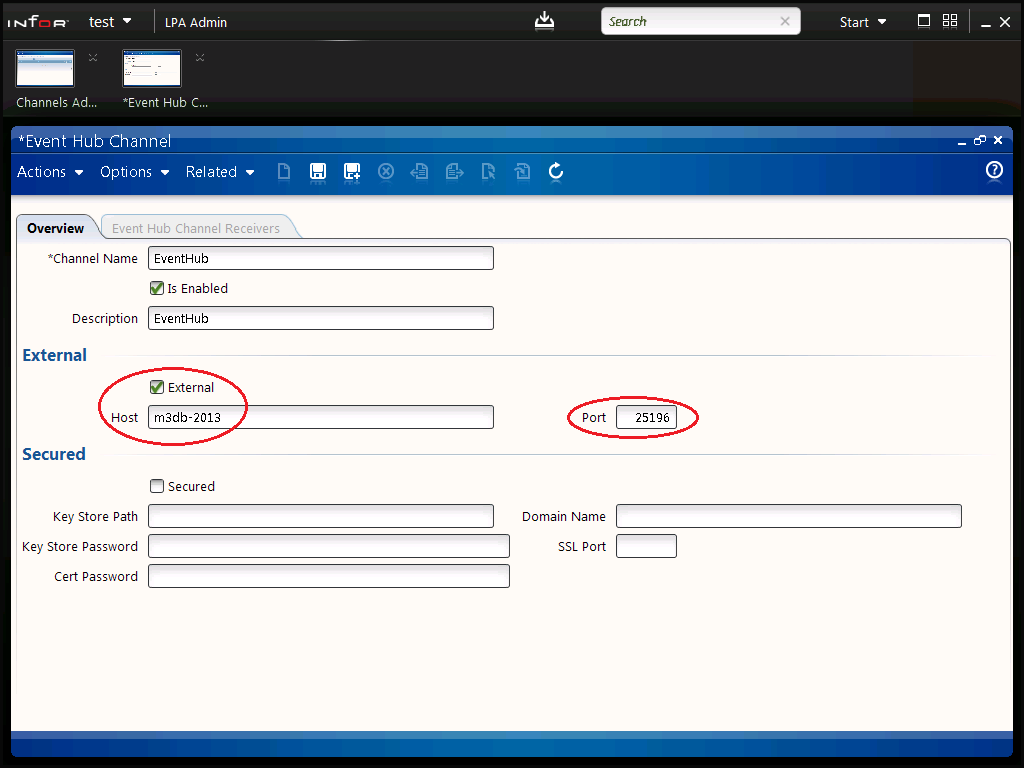
Then, I will enter the host and port number in IPA Rich Client Admin to setup IPA as a subscriber of Event Hub. (Conversely, IPA can also be a publisher and publish events to Event Hub but I won’t cover that scenario here.)
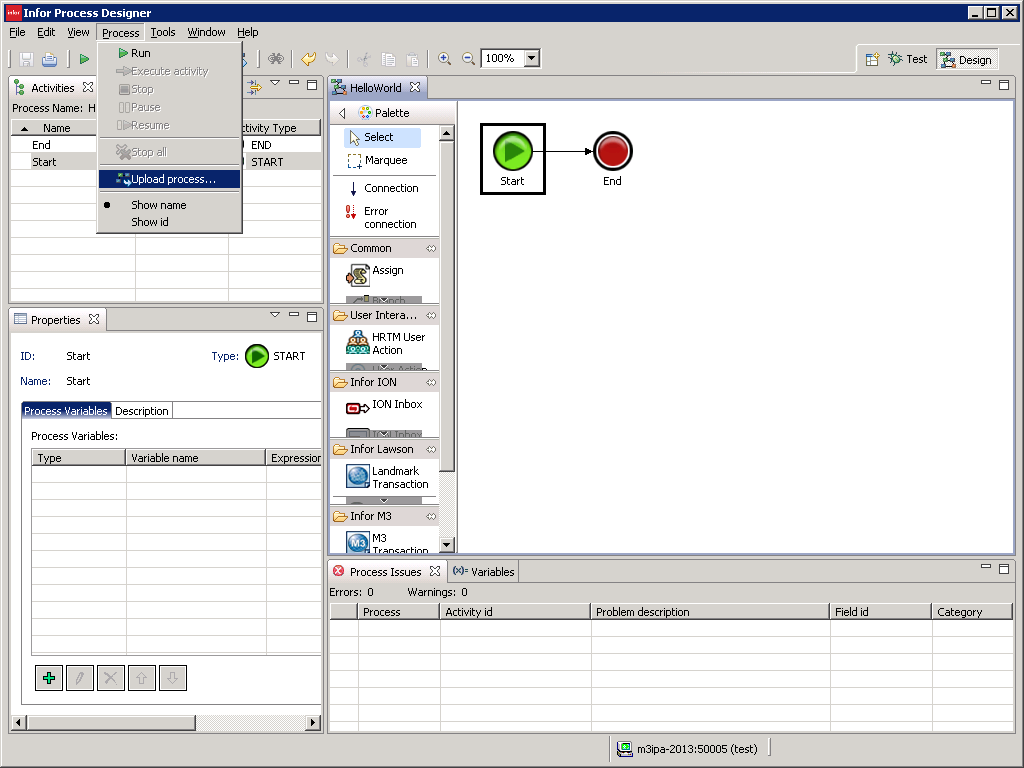
Then, I will create a HelloWorld flow, and I will setup a subscription M3:EUS001:X that will trigger the flow. The flow will be a simple Start -> End flow with no intermediate activity nodes. No need for fluff.
Finally, I will do a complete test, I will: start Infor Smart Office, open and close EUS001, and analyze the resulting WorkUnit in IPA.
Let’s go to the Event Hub Configuration in the Grid and determine what the host and port number are to subscribe to Event Hub:


Then, let’s enter the host and port number in IPA Rich Client Admin to setup IPA as a subscriber of Event Hub:

Then, let’s create a HelloWorld flow and setup a subscription M3:EUS001:X that will trigger the flow.


Finally, let’s do a complete test: start Infor Smart Office, open and close EUS001, and analyze the resulting WorkUnit in IPA.

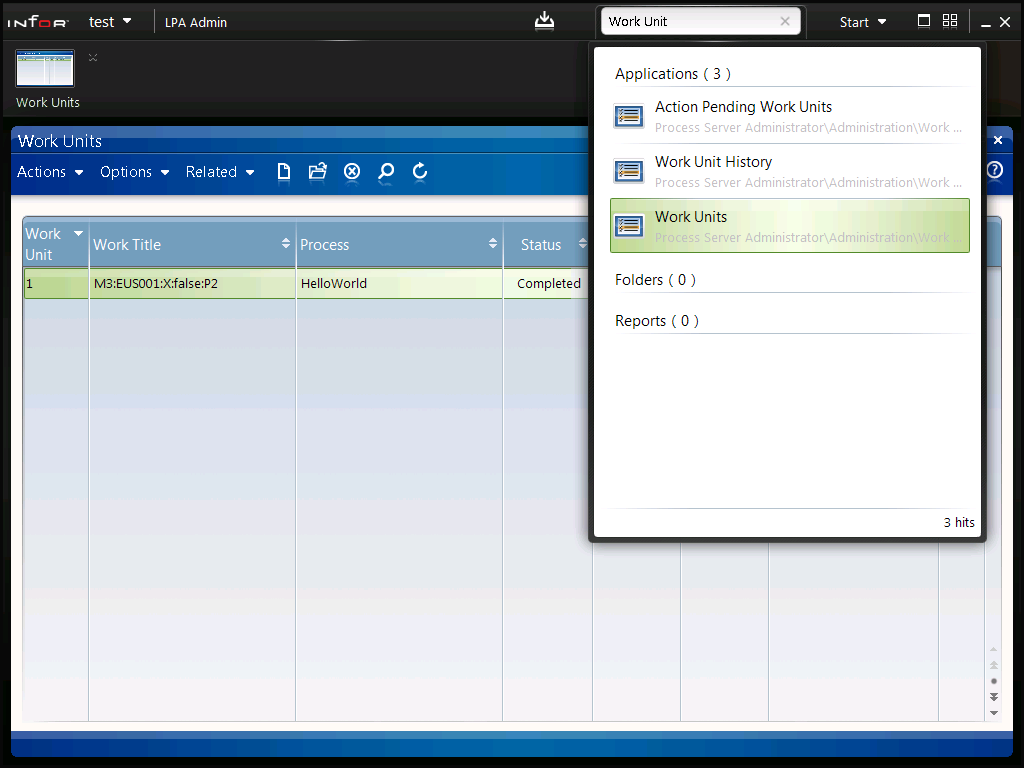

That’s it! We setup IPA as a subscriber of Event Hub, we created a receiver to subscribe to a specific event and trigger our flow, we did a test and caused the event to happen, and we analyzed the resulting WorkUnit. That illustrates how to setup Event Hub for IPA to receive M3 events in order to trigger a flow.
Next time I will show you how to setup Event Analytics for IPA and how to setup Drools Rules to filter events with conditions.
If you liked this, please subscribe to this blog by clicking the Follow button, and let us know your comments in the section below. You can also become an author and share your ideas (let me know and I’ll send you an author invite).
Posted by thibaudatwork
Categories: Event Hub, Event Analytics, Infor Process Automation (IPA)
Tags: Event Hub, M3, Process Automation
Mobile Site | Full Site
Get a free blog at WordPress.com Theme: WordPress Mobile Edition by Alex King.
[…] the host of Event Analytics as explained here, copy/paste the JAR file to the application’s lib folder in the Infor Grid, and restart the […]
LikeLike
By Java code in Event Analytics rules | M3 ideas on April 28, 2015 at 6:02 pm
I need to trigger IPA workflow from H5 client. I know how to do that at Smart office by using jscript.Net but as per my knowledge I’ve to type my script in jscript native format instead of jscript.Net. I need one simple example to get the syntax
LikeLike
By Ahmed Kouta on February 14, 2016 at 2:40 am
Hi Ahmed. There is still a way to trigger IPA flows via a URL, something like /bpm/something?something, I don’t remember the details though. You can decompile the JAR files or Smart Office DLL to find it.
LikeLike
By thibaudatwork on February 14, 2016 at 12:05 pm
Ahmed, I found my notes to trigger a process flow from a URL, more precisely from HTTP requests. First, you will need to authenticate to get a cookie, second you will need to trigger the process flow providing that authentication cookie. Here below are my sample tests from December. I don’t have a ready-made script for H5 Client; maybe there is already one included in H5 Client, I haven’t looked. Hope it helps. –Thibaud
Step 1 – SSOServlet to get cookie C.LWSN [NOTE: LEAKS PASSWORD IN URL AND IN CLEAR TEXT]
GET http://host:81/sso/SSOServlet?_ssoUser=JOHN&_ssoPass=*****&_ssoLogin=Login&_action=LOGIN HTTP/1.1
Host: host:81
User-Agent: Mozilla/5.0
HTTP/1.1 302 Found
Date: Thu, 10 Dec 2015 01:34:11 GMT
X-Powered-By: Servlet/3.0
P3P: CP="IDC DSP COR ADM DEVi TAIi PSA PSD IVAi IVDi CONi HIS OUR IND CNT"
Pragma: no-cache
Cache-Control: no-store, no-cache, must-revalidate, private, proxy-revalidate
Expires: Thu, 01 Jan 1970 00:00:00 GMT
Last-Modified: Thu, 10 Dec 2015 01:34:11 GMT
SSO_STATUS: LoginSuccessful
SSO_TIMEOUT_REMAINING: 3600000
Location: http://host:81/lawson/
Content-Length: 0
Set-Cookie: JSESSIONID=0123456789ABCDEFGHIJK:-1; Path=/; HttpOnly
Set-Cookie: C.LWSN=0123456789QWERTYUIOPLKJHGFDSAZXCVBNM; Path=/
Content-Language: en-US
Step 2 – Trigger with cookie C.LWSN
POST http://host:81/bpm/trigger HTTP/1.1
Host: host:81
Content-Type: application/xml
Content-Length: 715
User-Agent: Mozilla/5.0
Cookie: C.LWSN=0123456789QWERTYUIOPLKJHGFDSAZXCVBNM; Path=/
<?xml version="1.0"?>
<bpm-trigger-input name="Test" eventType="ServiceAsync" function="initiate">
<work-title>Test</work-title>
<product></product>
<data-area>lmdevipa</data-area>
<user>JOHN</user>
<category-value></category-value>
<business-criterias>
<business-criteria></business-criteria>
<business-criteria></business-criteria>
<business-criteria></business-criteria>
</business-criterias>
<variables>
<variable><name>{0}</name><value>{1}</value></variable>
<variable><name>{0}</name><value>{1}</value></variable>
<variable><name>{0}</name><value>{1}</value></variable>
</variables>
<folders></folders>
</bpm-trigger-input>
HTTP/1.1 200 OK
Date: Thu, 10 Dec 2015 01:34:54 GMT
X-Powered-By: Servlet/3.0
Pragma: no-cache
Cache-Control: no-store, no-cache, must-revalidate, private, proxy-revalidate
Expires: Thu, 01 Jan 1970 00:00:00 GMT
Last-Modified: Thu, 10 Dec 2015 01:34:54 GMT
Content-Language: en-US
Content-Length: 258
<?xml version="1.0" encoding="UTF-8" standalone="yes"?>
<bpm-trigger-result workUnitNumber="801">
<return-code>0</return-code>
<detail-message>Workunit 801 released for processing</detail-message>
<errorCode>0</errorCode>
</bpm-trigger-result>
LikeLike
By thibaudatwork on February 15, 2016 at 10:43 am
Hi Thibaud,
really I’ve no idea about your last reply. could you show me how to do that?
Regards,
LikeLike
By Ahmed Kouta on February 16, 2016 at 12:10 am
Ahmed. Use JavaScript XMLHttpRequest. -Thibaud
LikeLike
By thibaudatwork on February 16, 2016 at 10:43 am
Hi Ahmed,
Try this URL /bpm/trigger?triggerType=ProcessAsync&triggerName=theProcessName&dataArea=DEV&workTitle=Hello&varName[0]=abc&varValue[0]=123&user=Thibaud
If that doesn’t work, replace trigger with trigger.do, add method=Start, add the parameters product and categoryValue.
/Thibaud
LikeLike
By thibaudatwork on August 11, 2016 at 8:21 am
See more at https://m3ideas.org/2012/04/11/how-to-call-a-process-flow-from-a-smart-office-script/#comment-6013
LikeLike
By thibaudatwork on August 31, 2016 at 7:33 pm
[…] Event Hub for Infor Process Automation (IPA) […]
LikeLike
By Site map – M3 ideas on May 9, 2017 at 12:21 pm