December 15, 2011 1:49 pm
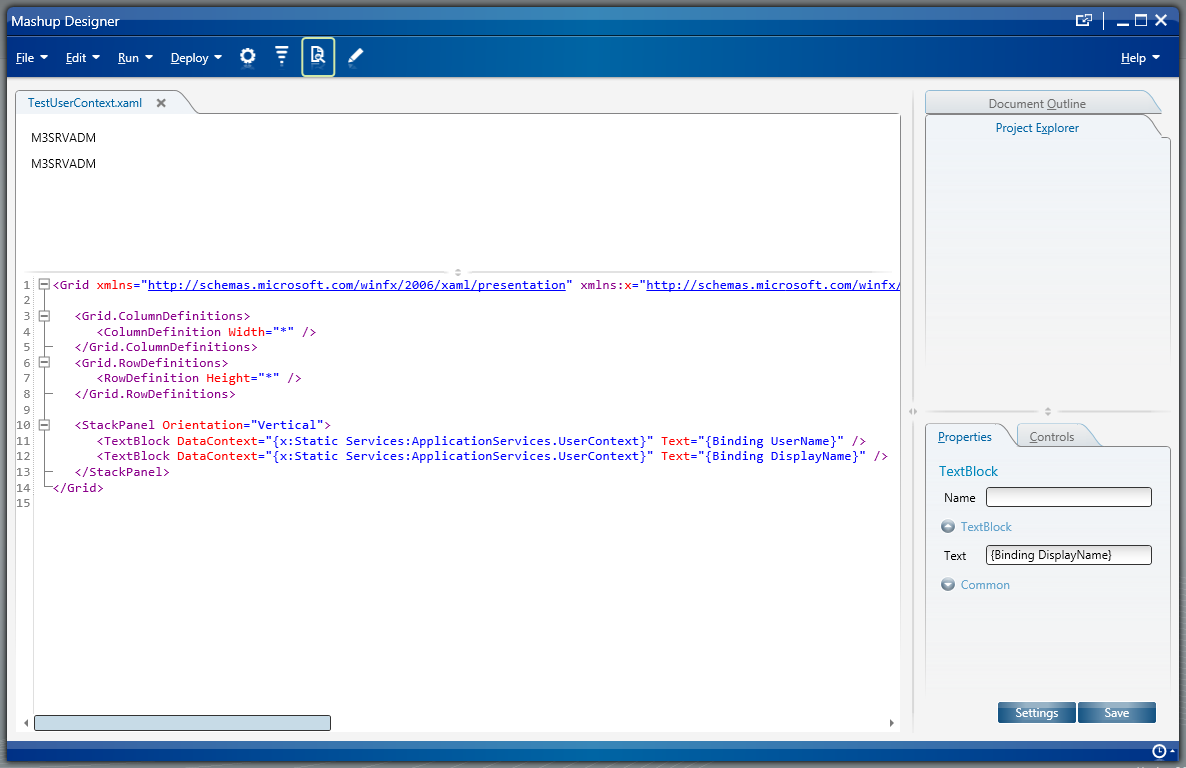
Here is the solution to get the current username in a Mashup in Lawson Smart Office. Last week I wrote a post on How to get the current M3 profile in a Mashup which returns DEV, EDU, TST, PRD, etc. depending on which profile you are currently connected. This week I post about the username:
Here is a screenshot of the result:
I found inspiration from the Smart Office Developer’s Guide > UserAndProfileExample.js.
Posted by thibaudatwork
Categories: Infor Smart Office Mashups
Tags: Mashup, Smart Office
Mobile Site | Full Site
Get a free blog at WordPress.com Theme: WordPress Mobile Edition by Alex King.
[…] (DIVI), and Facility (FACI) in a Mashup in Lawson Smart Office. Last week I wrote a post on How to get the current username in a Mashup. This week I post about CONO, DIVI, […]
LikeLike
By How to get CONO, DIVI, FACI in a Mashup « M3 ideas on December 19, 2011 at 10:15 am
[…] How to get the current username in a Mashup […]
LikeLike
By Site map – M3 ideas on May 9, 2017 at 12:24 pm