I’ve seen a previously posts describing how to put security on a whole mashup.
But what if it is a mashup designed for all end-users, but part of it should be for limited users only, when using MI/Data Panels?
I will provide an example where I disable a GroupBox based on the CurrentUser access to MMS001 from SES401.
The first problem I ran into, was that there was missing an MI transaction to retrieve the user access, or at least I couldn’t find one.
So I create a new transaction in MDBREADMI, from CMNPUS to get the ALO field to get the values.
Input:
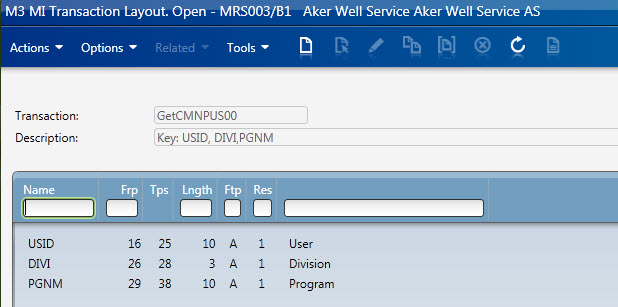
Output:

The next problem I had was that I had to run the MI transaction for user validation’ immediately’ on startup.
However, I couldn’t get the binding correct. It was like the MI startup event was triggered before I was able to bind the currentuser.
( There might be other ways to do this, it might just be me having problems with this kind of binding)
My work around for this was adding in a timer with a second delay. Which allowed me to run the MI Panel with the UserName.
I used a TriggerPanel on the startup which started the timer. The MIPanel was then triggered by Elapsed time after a second.
And then I had all the information required. Using a Hidden TextBox with a style.trigger to catch the UserAccess value ([ALO]).
Then I could bind the the text property directly to the GroupBox IsEnabled.
Here is an snapshot of the .xaml attached.

Here is a snapshot where I use this in the real world, where you see everything is disabled.
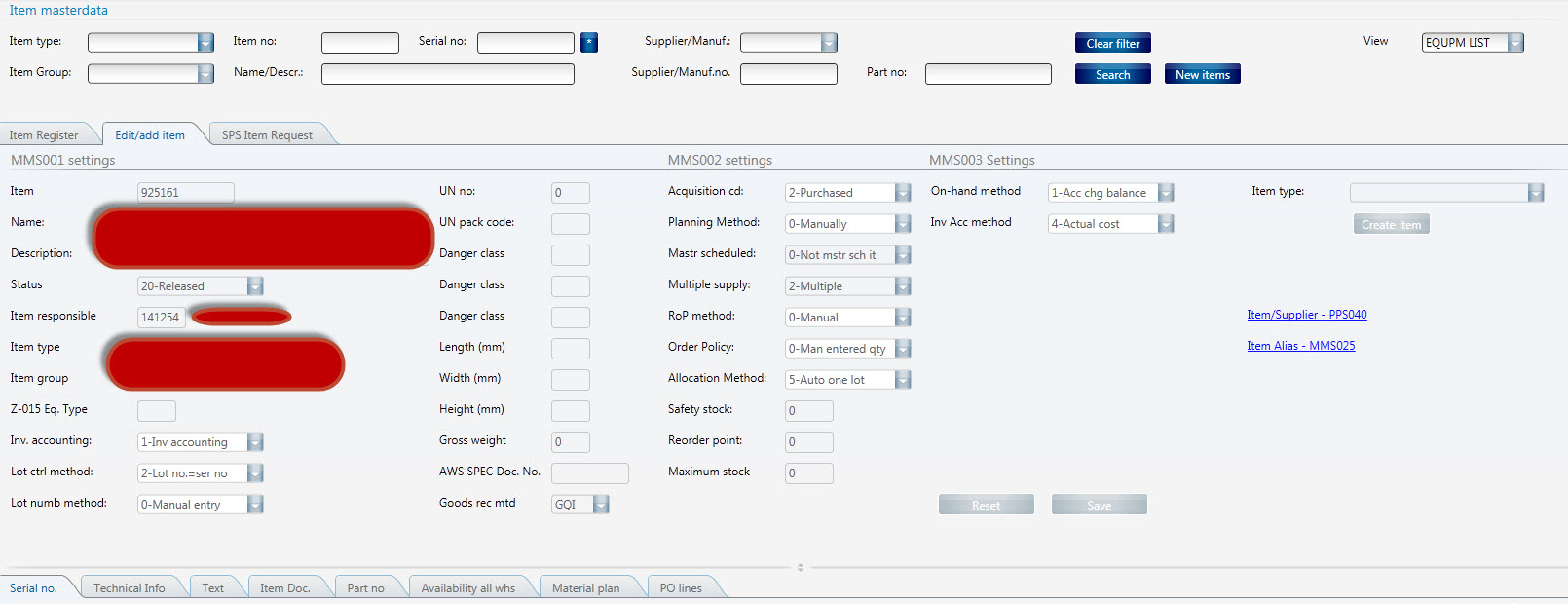
Attached is a full working source code. ( You have to create the MDBREADMI transaction first)
<Grid xmlns="http://schemas.microsoft.com/winfx/2006/xaml/presentation" xmlns:x="http://schemas.microsoft.com/winfx/2006/xaml" xmlns:ui="clr-namespace:Mango.UI.Controls;assembly=Mango.UI" xmlns:mashup="clr-namespace:Mango.UI.Services.Mashup;assembly=Mango.UI" xmlns:ps="clr-namespace:PF.Client.Mashup;assembly=PF.Client" xmlns:m3="clr-namespace:MForms.Mashup;assembly=MForms" xmlns:Services="clr-namespace:Mango.Services;assembly=Mango.Core">
	<Grid.Resources>
	</Grid.Resources>

	<Grid.ColumnDefinitions>
		<ColumnDefinition Width="1*" />
	</Grid.ColumnDefinitions>
	<Grid.RowDefinitions>
		<RowDefinition Height="300" />
		<RowDefinition Height="1*" />

		<RowDefinition Height="Auto" />
	</Grid.RowDefinitions>

<!-- Startup Event -->
	<ps:TriggerPanel Name="ItemMasterUserNameTrigger">
		<ps:TriggerPanel.Events>
			<mashup:Events>
				<mashup:Event TargetName="ItemMasterUserNameTimer" SourceEventName="Startup" TargetEventName="Start" />
			</mashup:Events>
		</ps:TriggerPanel.Events>
	</ps:TriggerPanel>

	<mashup:Timer Name="ItemMasterUserNameTimer" Interval="0:0:01" ElapsedCount="1" Count="1" MinInterval="0:0:01" />

<!-- Hidden TextBlock to get UserName -->
	<TextBlock Name="ItemMasterUserName" DataContext="{x:Static Services:ApplicationServices.UserContext}" Text="{Binding UserName}" Visibility="Hidden" />

	<m3:MIPanel Name="ItemMasterDataReadOnlyMI">
		<m3:MIPanel.Events>
			<mashup:Events>
				<mashup:Event TargetName="ItemMasterDataReadOnlyMI" TargetEventName="Get" SourceEventName="Elapsed" SourceName="ItemMasterUserNameTimer">
					<mashup:Parameter TargetKey="USID" Value="{Binding ElementName=ItemMasterUserName, Path=Text}" />
					<mashup:Parameter TargetKey="DIVI" Value="{mashup:UserContextValue Path=M3/Division}" />
					<mashup:Parameter TargetKey="PGNM" Value="MMS001" />
				</mashup:Event>
			</mashup:Events>
		</m3:MIPanel.Events>
		<m3:MIPanel.DataSource>
			<m3:MIDataSource Program="MDBREADMI" Transaction="GetCMNPUS00" Type="Get" InputFields="USID,DIVI,PGNM" OutputFields="ALO" MaxReturnedRecords="1" />
		</m3:MIPanel.DataSource>
	</m3:MIPanel>

<!-- Validation check, disabled by default  -->
	<TextBox Name="ItemUserValid" Visibility="Hidden">
		<TextBox.Style>
			<Style x:Key="UserCheck" TargetType="{x:Type TextBox}" BasedOn="{StaticResource {x:Type TextBox}}">
				<Setter Property="Text" Value="False" />
				<Style.Triggers>
					<MultiDataTrigger>
						<Setter Property="Text" Value="False" />
					</MultiDataTrigger>
					<MultiDataTrigger>
						<MultiDataTrigger.Conditions>
							<Condition Binding="{Binding ElementName=ItemMasterDataReadOnlyMI, Path=[ALO]}" Value="111111111" />
						</MultiDataTrigger.Conditions>
						<Setter Property="Text" Value="True" />
					</MultiDataTrigger>
				</Style.Triggers>
			</Style>
		</TextBox.Style>
	</TextBox>

<!--  Setting the GroupBox Enabled or Disabled based on the CurrentUser acccess to MMS001 -->
	<GroupBox Name="GroupBox" Header="Validation" Style="{DynamicResource styleGroupLineMashup}" IsEnabled="{Binding ElementName=ItemUserValid, Path=Text}" Grid.Row="0">
		<Grid Margin="0,0,0,8">
			<Grid.ColumnDefinitions>
				<ColumnDefinition Width="100" />
				<ColumnDefinition Width="110" />
			</Grid.ColumnDefinitions>
			<Grid.RowDefinitions>
				<RowDefinition Height="32" />
				<RowDefinition Height="32" />
			</Grid.RowDefinitions>

			<Button Name="Button" Content="Button" Grid.Column="0" Grid.Row="0" />
			<Label Content="IsEnabled" Grid.Row="1" Grid.Column="0" />
			<TextBox Text="{Binding ElementName=ItemUserValid, Path=Text}" Grid.Row="1" Grid.Column="1" MinWidth="100" MaxWidth="100" />

		</Grid>
	</GroupBox>

	<GroupBox Name="GroupBox2" Header="No Validation" Style="{DynamicResource styleGroupLineMashup}" Grid.Row="1">
		<Grid Margin="0,0,0,8">
			<Grid.ColumnDefinitions>
				<ColumnDefinition Width="100" />
				<ColumnDefinition Width="110" />
			</Grid.ColumnDefinitions>
			<Grid.RowDefinitions>
				<RowDefinition Height="32" />
				<RowDefinition Height="32" />
			</Grid.RowDefinitions>

			<Button Content="Button" Grid.Column="0" Grid.Row="0" />
			<Label Content="IsEnabled" Grid.Row="1" Grid.Column="0" />
			<TextBox Name="TextBox" Text="Test 1" Grid.Row="1" Grid.Column="1" MinWidth="100" MaxWidth="100" />

		</Grid>
	</GroupBox>
	<ui:StatusBar Name="StatusBar" Grid.Row="1" Grid.Column="0" />
</Grid>
Regards
Ken Eric
 M3 ideas
Hi Ken Eric
I’ve tested this great post, but I struggle With one parameter, and its the username. In the code you get the current user with Text=”{Binding UserName}”. This code Return the username in lower case .
But when I run the MDBREAD Get-command, the API expects it to be uppercase,
How can you read the current username in uppercase?
LikeLike
Hi Jon Trygve,
Thanks for the information.
Of course I only tested this on Numeric values. My apologies.
Normally I use the CharacterCasing=”True” for UpperCase, but that doesn’t work with bindings.
I have not been able to find a solution to this using MIPanel yet.
The only answer I could provide you right now to make this work, is to replace the MIPanel with a DataListPanel and collect the ALO value with SQL instead, through Web Service.
Example :
SELECT KPALO
FROM CMNPUS
WHERE KPUSID=’202231′
AND KPCONO=1
AND KPDIVI=’100′
AND KPPGNM=’MMS001′
Regards
Ken Eric
LikeLike
Hi Jon Trygve,
If you add the CharacterCasing=Upper to the event parameter, instead of the TextBox it should work.
Example:
Regards
Ken Eric
LikeLike
Thanx! This work perfect!
LikeLike
I’m glad it works for you too. Thank you for the feedback 🙂
LikeLike