Here is how to create and invoke application proxies of the Infor Grid.
What is an application proxy?
An application proxy is an interface for a Grid application that other applications of the Grid or client applications outside the Grid can invoke; it is inter-process communication in a distributed environment.
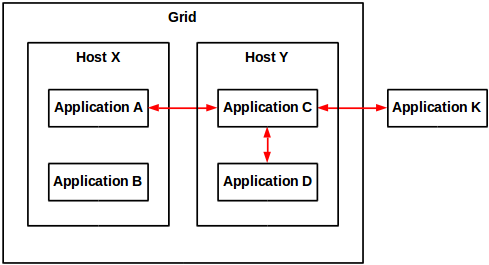
How to create an application proxy?
To create a proxy for a Grid application:
package net.company.your;

import com.lawson.grid.node.application.ApplicationEntryPoint;
import com.lawson.grid.node.application.ModuleContext;
import com.lawson.grid.proxy.ProxyException;
import com.lawson.grid.proxy.ProxyServer;

public interface HelloWorldProxy {
    public String hello(String name) throws ProxyException;
}

public class HelloWorld implements HelloWorldProxy {
    public String hello(String name) {
        return "Hello, " + name;
    }
}

public class HelloWorldApp implements ApplicationEntryPoint {
    public boolean startModule(ModuleContext context) {
        ProxyServer.registerProxy(HelloWorldProxy.class, new HelloWorld());
        return true;
    }
    public void stopModule() {
    }
}
Note: For details on how to create a Grid application, refer to the previous post on the subject.
The proxy is now ready to be invoked:

How to call the proxy from a Grid application?
To invoke the proxy from a Grid application:
The short source code is:
Registry registry = Node.getRegistry();
HelloWorldProxy proxy = registry.getProxy(HelloWorldProxy.class);
String result = proxy.hello("Thibaud");
The long source code is:
package net.company2.your;

import com.lawson.grid.node.application.ApplicationEntryPoint;
import com.lawson.grid.node.application.ModuleContext;
import com.lawson.grid.node.Node;
import com.lawson.grid.proxy.ProxyException;
import com.lawson.grid.registry.Registry;
import net.company.your.HelloWorldProxy;

public class HelloWorldApp2 implements ApplicationEntryPoint {
	public boolean startModule(ModuleContext context) {
		// connect
		Registry registry = Node.getRegistry();
		if (!registry.isConnected()) {
			System.err.println("failed to connect");
			return false;
		} else {
			System.out.println("connected to " + registry.getGridName());
		}
		// get the proxy
		HelloWorldProxy proxy = (HelloWorldProxy)registry.getProxy(HelloWorldProxy.class);
		if (proxy == null) {
			System.err.println("failed to get proxy...exiting");
			return false;
		} else {
			System.out.println("got proxy");
		}
		// invoke the proxy
		try {
			String result = proxy.hello("Thibaud");
			System.out.println(result);
		} catch (ProxyException e) {
			System.err.println(e.getMessage());
			e.printStackTrace();
			return false;
		}
		return true;
	}

	public void stopModule() {
	}

}
How to call the proxy from a client application?
To invoke the application proxy from a client application outside the Grid:
First, choose a Grid registry’s hostname and port number (a registry is a special node that keeps track of all nodes in a Grid):

Then, connect to the Grid, get the proxy and invoke its methods.
The short source code is:
ClientRegistry registry = new ClientRegistry("Test");
registry.connect(hostname, portNumber);
HelloWorldProxy proxy = registry.getProxy(HelloWorldProxy.class);
String result = proxy.hello("Thibaud");
The long source code is:
import com.lawson.grid.proxy.ProxyConnectionFailedException;
import com.lawson.grid.proxy.ProxyException;
import com.lawson.grid.proxy.access.GridPrincipal;
import com.lawson.grid.proxy.access.SessionId;
import com.lawson.grid.proxy.access.SessionProvider;
import com.lawson.grid.proxy.access.SessionUtils;
import com.lawson.grid.registry.ClientRegistry;
import net.company.your.HelloWorldProxy;

public class Test {
    public static void main(String[] args) {

        // connect
        ClientRegistry registry = new ClientRegistry("Test");
        try {
            registry.connect("host1623", 22102);
        } catch (ProxyConnectionFailedException e) {
            System.err.println(e.getMessage());
            e.printStackTrace();
            return;
        }
        if (!registry.isConnected()) {
            System.err.println("failed to connect");
            return;
        } else {
            System.out.println("connected to " + registry.getGridName());
        }

        // get the proxy
        HelloWorldProxy proxy = (HelloWorldProxy)registry.getProxy(HelloWorldProxy.class);
        if (proxy == null) {
            System.err.println("failed to get proxy...exiting");
            return;
        } else {
            System.out.println("got proxy");
        }

        // invoke the proxy
        try {
            String result = proxy.hello("Thibaud");
            System.out.println(result);
        } catch (ProxyException e) {
            System.err.println(e.getMessage());
            e.printStackTrace();
            return;
        }

        // disconnect
        registry.close();
        if (!registry.isClosed()) {
            System.err.println("failed to close");
        } else {
            System.out.println("registry closed");
        }
    }

}
That’s it. Please like, subscribe, share.

 M3 ideas
NOTE: compile and execute with classpath to D:\Infor\LifeCycle\?\grid\?\runtimes\1.11.47\resources\grid-core-1.11.47.jar
LikeLike