There are several techniques to create an XML document in a Personalized Script for Lawson Smart Office. The programming language is JScript.NET.
1) XElement
Here’s an example with LINQ’s XElement :
import System;
import System.Xml.Linq;

package MForms.JScript {
     class Test {
         public function Init(element: Object, args: Object, controller : Object, debug : Object) {
             var x: XElement = new XElement('hello',
                 new XAttribute('id', 'message'),
                 new XElement('world', 'Hello World!'));
             debug.WriteLine(x.ToString());
         }
     }
 }
It produces the following XML:
<hello id="message">
  <world>Hello World!</world>
</hello>
Here’s a screenshot of the result:

2) XmlDocument
Here’s an example with XmlDocument:
import System;
import System.Xml;

package MForms.JScript {
     class Test {
         public function Init(element: Object, args: Object, controller : Object, debug : Object) {
             var doc: XmlDocument = new XmlDocument();
             var dec: XmlDeclaration = doc.CreateXmlDeclaration('1.0', null, null);
             doc.AppendChild(dec);
             var root: XmlElement = doc.CreateElement('hello');
             doc.AppendChild(root);
             var child: XmlElement = doc.CreateElement('world');
             child.SetAttribute('id', 'message');
             child.InnerText = 'Hello World!';
             root.AppendChild(child);
             debug.WriteLine(doc.OuterXml);
         }
     }
}
It produces the following XML:
<?xml version="1.0"?><hello><world id="message">Hello World!</world></hello>
Here’s a screenshot of the result:

3) XmlWriter
And here’s an example with XmlWriter:
import System;
import System.Xml;
import System.Text;

package MForms.JScript {
     class Test {
         public function Init(element: Object, args: Object, controller : Object, debug : Object) {
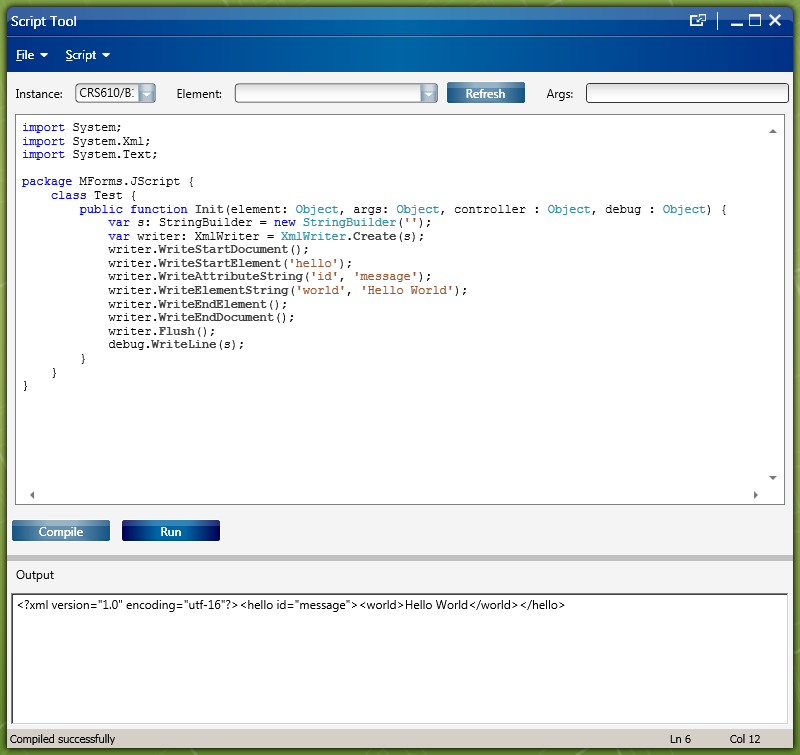
             var s: StringBuilder = new StringBuilder('');
             var writer: XmlWriter = XmlWriter.Create(s);
             writer.WriteStartDocument();
             writer.WriteStartElement('hello');
             writer.WriteAttributeString('id', 'message');
             writer.WriteElementString('world', 'Hello World');
             writer.WriteEndElement();
             writer.WriteEndDocument();
             writer.Flush();
             debug.WriteLine(s);
         }
     }
}
It produces the following XML:
<?xml version="1.0" encoding="utf-16"?><hello id="message"><world>Hello World</world></hello>
Here’s a screenshot of the result:
4) XmlSerializer
Here’s an example with XmlSerializer:
import System.Text;
import System.Xml;
import System.Xml.Serialization;

package MForms.JScript {
     class Test {
         public function Init(element: Object, args: Object, controller : Object, debug : Object) {
             var o = new Hello();
             var s = new XmlSerializer(o.GetType(), 'thibaudns');
             var b: StringBuilder = new StringBuilder('');
              var writer: XmlWriter = XmlWriter.Create(b);
             s.Serialize(writer, o);
             debug.WriteLine(b);
         }
     }
     class Hello {
         var World: String = 'Hello World!';
     }
}
It produces the following XML:
<?xml version="1.0" encoding="utf-16"?>
<Hello xmlns:xsi="http://www.w3.org/2001/XMLSchema-instance" xmlns:xsd="http://www.w3.org/2001/XMLSchema" xmlns="thibaudns">
<World>Hello World!</World>
</Hello>
Here’s a screenshot of the result:

Discussion
Here is a discussion on when to use which solution.
Note: I tested these examples with Lawson Smart Office 9.1.3.1.7.


 M3 ideas