Here’s the XAML code to add a date picker in a Mashup, using DatePicker:
<DatePicker Name="dp" SelectedDateFormat="Short" />
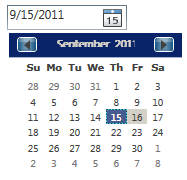
The result looks like this:
If you want to get the value of the date picker use this:
{Binding ElementName=dp, Path=Text}
Here’s a simple Mashup that shows the selected date in a Label:
<Grid xmlns="http://schemas.microsoft.com/winfx/2006/xaml/presentation" xmlns:x="http://schemas.microsoft.com/winfx/2006/xaml" xmlns:ui="clr-namespace:Mango.UI.Controls;assembly=Mango.UI" xmlns:mashup="clr-namespace:Mango.UI.Services.Mashup;assembly=Mango.UI" xmlns:wf="clr-namespace: System.Windows.Forms;assembly=System.Windows.Forms" xmlns:wfi="clr-namespace: System.Windows.Forms.Integration;assembly=WindowsFormsIntegration">
    <Grid.Resources>
    </Grid.Resources>

    <Grid.ColumnDefinitions>
       <ColumnDefinition Width="Auto" />
       <ColumnDefinition Width="*" />
    </Grid.ColumnDefinitions>
    <Grid.RowDefinitions>
       <RowDefinition Height="Auto" />
    </Grid.RowDefinitions>

    <DatePicker Name="dp" SelectedDateFormat="Short" Grid.Column="0" />
    <Label Name="Date" Content="{Binding ElementName=dp, Path=Text}" Grid.Column="1" />

 </Grid>
That’s it!

 M3 ideas
2 thoughts on “Date picker in Mashup”