Here is a solution to write a Mashup in multiple languages in Lawson Smart Office, for example in English and Spanish. This task is a part of Localization (L10) and Internationalization (i18n).
Background
Smart Office is available in multiple languages, and the language can be switched by selecting Show (in the top right corner) > Settings > Lawson Smart Office > General:

We can write a Mashup so as to dynamically adapt to the current language.
1) Localization files
First, we create XML files with the constants in each target language. In this example I create the files en-us.xml and es.xml for English and Spanish, and I choose to place those files in a sub-folder named Localization in my Mashup folder:

We add the constants to the XML with a text editor such as Notepad. In this example, I have one constant Welcome which I set in English to Hello World! and in Spanish to Hola mundo!
My file en-us.xml contains:
<?xml version="1.0" encoding="utf-8" ?>
<assembly name="">
 <area name="">
 <entry name="Welcome">Hello World!</entry>
 </area>
</assembly>
My file es.xml contains:
<?xml version="1.0" encoding="utf-8" ?>
<assembly name="">
 <area name="">
 <entry name="Welcome">Hola mundo!</entry>
 </area>
</assembly>
We add as many <entry> elements as we have constants.
2) Project
Then, we declare those XML files in the Project in Mashup Designer.
For that, select File > Add Resource, and browse to the XML files, en-us.xml and es.xml in my example:
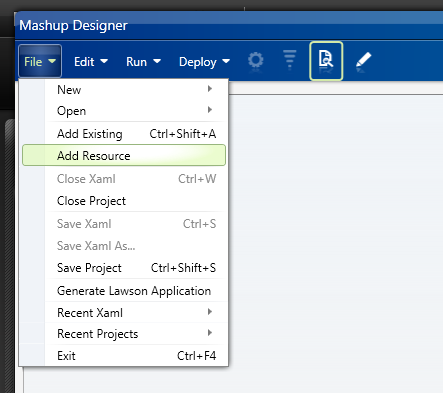
That will add the XML files to the Project Explorer:

3) XAML
Finally, we invoke our constants from the XAML code with the binding {mashup:Constant constant}. In this example I invoke the constant Welcome in a Label:

The XAML code will look like:
<Label Content="{mashup:Constant Welcome}" />
Result
Here is a screenshot of the Mashup in English:

Here is a screenshot of the Mashup in Spanish:

For more examples regarding translation, read the article Translate M3 with Google Translate API to automatically translate M3 and user-generated content in 52 languages.
Thanks to Juan V, and karinpb for their help!

 M3 ideas
2 thoughts on “Write a Mashup in multiple languages”