Today I will share some of my experience with the GridView in combination with MIListPanel and MIPanel. It’s a pretty simple solution, but I spent quite some time myself getting it to work the first time, so I hope it’s worth sharing.
My case scenario was to work with multiple lines. I wanted to be able to edit and update in a more “practical” way than having to select a line and then edit from a different panel followed by clicking a button. Sometimes it can be feel to “slow”, and sometimes it just takes too much space.
What I tried to do, was to create an all-in-one solution, by using the GridViewColumn.CellTemplate and actually open the cell in the GridView for editing and adding a button for update. It takes less space, and when processing multiple lines, it sure does feel a lot more user friendly than some of my previous solutions when I first started working with mashup.
The .xaml sample will look something like this:
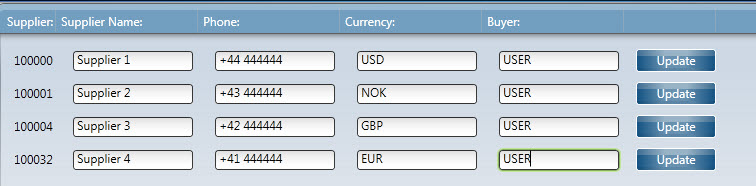
The list is based on CRS620MI, LstSuppliers. The button is connected to the CRS620MI, UpdSupplier. Using the GridViewColumn.CellTemplate will allow you to create a DataTemplate inside the cell, and I think you can do pretty much anything you want when working with DataTemplate.
Here is also a few different scenarios as well using the same method.
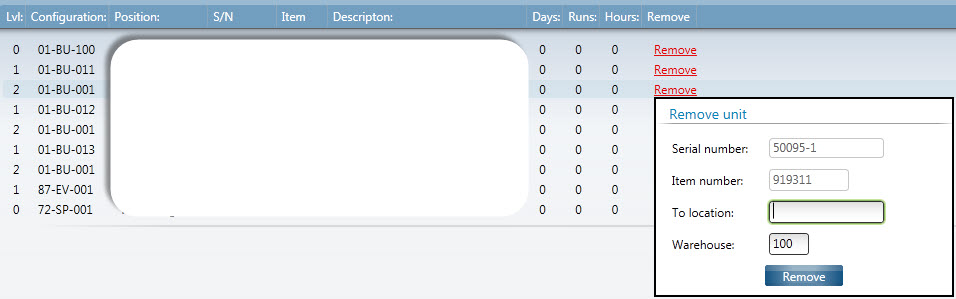
Example one is built for speed, when you need to repeat the same task multiple times based on a list.

Example two allows you to provide more input. In this case I built a popup inside the CellTemplate. To learn how to create the popup see my previous post .
<TabItem Header="Attached items">
 <StackPanel>

    <m3:MIListPanel Name="MOS256List">
                <m3:MIListPanel.Events>
                   <mashup:Events>
                      <mashup:Event SourceEventName="CurrentItemChanged" SourceName="MMS240List2">
                         <mashup:Parameter TargetKey="MTRL" SourceKey="ITNO" />
                         <mashup:Parameter TargetKey="SERN" SourceKey="SERN" />
                         <mashup:Parameter TargetKey="EXPA" Value="Y" />
                      </mashup:Event>
                   </mashup:Events>
                </m3:MIListPanel.Events>
                <m3:MIListPanel.DataSource>
                   <m3:MIDataSource Program="MOS256MI" Transaction="LstAsBuildLevel" Type="List" InputFields="MTRL,SERN" OutputFields="MTRL,SERN,CFGL,ITNO,SER2,ITDS,LVLS,TX40,MES1,MES2,MES3,MES4,MVA1,MVA2,MVA3,MVA4,STAT" MaxReturnedRecords="50" />
                </m3:MIListPanel.DataSource>

                <ListView ItemsSource="{Binding Items}" Style="{DynamicResource styleListView}" ItemContainerStyle="{DynamicResource styleListViewItem}">
                   <ListView.View>
                      <GridView ColumnHeaderContainerStyle="{DynamicResource styleGridViewColumnHeader}">
                         <GridView.Columns>
                            <GridViewColumn Header="Lvl:" DisplayMemberBinding="{Binding [LVLS]}" />
                            <GridViewColumn Header="Configuration:" DisplayMemberBinding="{Binding [CFGL]}" />
                            <GridViewColumn Header="Position:" DisplayMemberBinding="{Binding [TX40]}" />
                            <GridViewColumn Header="S/N" DisplayMemberBinding="{Binding [SER2]}" />
                            <GridViewColumn Header="Item" DisplayMemberBinding="{Binding [ITNO]}" />
                            <GridViewColumn Header="Descripton:" DisplayMemberBinding="{Binding [ITDS]}" />
                            <GridViewColumn Header="Days:" DisplayMemberBinding="{Binding [MVA1]}" />
                            <GridViewColumn Header="Runs:" DisplayMemberBinding="{Binding [MVA2]}" />
                            <GridViewColumn Header="Hours:" DisplayMemberBinding="{Binding [MVA3]}" />
                            <GridViewColumn Header="Remove">
                               <GridViewColumn.CellTemplate>
                                  <DataTemplate>
                                     <StackPanel>
                                        <ToggleButton Name="button">
                                           <ToggleButton.Template>
                                              <ControlTemplate TargetType="ToggleButton">
                                                 <TextBlock Text="Remove" Foreground="#FFE10101" TextDecorations="Underline" />
                                              </ControlTemplate>
                                           </ToggleButton.Template>
                                        </ToggleButton>

                                        <Popup IsOpen="{Binding IsChecked, ElementName=button, Mode=OneWay}" Width="300" Height="200" Popup.StaysOpen="False">
                                           <Border Background="White" BorderBrush="Black" BorderThickness="2">
                                              <Grid>
                                                 <Grid.RowDefinitions>
                                                    <RowDefinition Height="200" />
                                                 </Grid.RowDefinitions>
                                                 <Grid.ColumnDefinitions>
                                                    <ColumnDefinition Width="300" />
                                                 </Grid.ColumnDefinitions>
                                                 <StackPanel>
                                                    <GroupBox Header="Remove unit" Style="{DynamicResource styleGroupLineMashup}">
                                                       <Grid Margin="0,0,0,8">
                                                          <Grid.ColumnDefinitions>
                                                             <ColumnDefinition Width="100" />
                                                             <ColumnDefinition Width="200" />
                                                          </Grid.ColumnDefinitions>
                                                          <Grid.RowDefinitions>
                                                             <RowDefinition Height="32" />
                                                             <RowDefinition Height="32" />
                                                             <RowDefinition Height="32" />
                                                             <RowDefinition Height="32" />
                                                             <RowDefinition Height="32" />
                                                          </Grid.RowDefinitions>

                                                          <TextBlock Text="Serial number:" Grid.Row="0" Grid.Column="0" Margin="8,8,0,0" />
                                                          <TextBox Text="{Binding [SER2]}" Grid.Row="0" Grid.Column="1" MinWidth="115" MaxWidth="115" HorizontalAlignment="Left" IsEnabled="False" />
                                                          <TextBlock Text="Item number:" Grid.Row="1" Grid.Column="0" Margin="8,8,0,0" />
                                                          <TextBox Text="{Binding [ITNO]}" Grid.Row="1" Grid.Column="1" MinWidth="80" MaxWidth="80" HorizontalAlignment="Left" IsEnabled="False" />
                                                          <TextBlock Text="To location:" Grid.Row="2" Grid.Column="0" Margin="8,8,0,0" />
                                                          <TextBox Name="RemoveLocation" Text="" Grid.Row="2" Grid.Column="1" MinWidth="115" MaxWidth="80" HorizontalAlignment="Left" />
                                                          <TextBlock Text="Warehouse:" Grid.Row="3" Grid.Column="0" Margin="8,8,0,0" />
                                                          <TextBox Name="RemoveWhs" Text="100" Grid.Row="3" Grid.Column="1" MinWidth="40" MaxWidth="40" HorizontalAlignment="Left" />

                                                          <Button Name="Install" Content="Remove" Grid.Row="4" Grid.Column="1" HorizontalAlignment="Left" Margin="0,0,50,0">
                                                             <Button.CommandParameter>
                                                                <mashup:Events>
                                                                   <mashup:Event SourceEventName="Click" TargetName="RemoveInstall" TargetEventName="Update" Debug="True">
                                                                      <mashup:Parameter TargetKey="RITP" Value="R" />
                                                                      <mashup:Parameter TargetKey="RESP" Value="202231" />
                                                                      <mashup:Parameter TargetKey="TRDT" Value="20130927" />
                                                                      <mashup:Parameter TargetKey="TRTM" Value="090909" />
                                                                      <mashup:Parameter TargetKey="WHLO" Value="{Binding Path=Text, ElementName=RemoveWhs}" />
                                                                      <mashup:Parameter TargetKey="RSC4" Value="CHG" />
                                                                      <mashup:Parameter TargetKey="ITNR" Value="{Binding [ITNO]}" />
                                                                      <mashup:Parameter TargetKey="BANR" Value="{Binding [SER2]}" />
                                                                      <mashup:Parameter TargetKey="TWSL" Value="{Binding Path=Text, ElementName=RemoveLocation}" />
                                                                      <mashup:Parameter TargetKey="NHAR" Value="{Binding [MTRL]}" />
                                                                      <mashup:Parameter TargetKey="NHSR" Value="{Binding [SERN]}" />
                                                                      <mashup:Parameter TargetKey="CFGR" Value="{Binding [CFGL]}" />
                                                                   </mashup:Event>
                                                                </mashup:Events>
                                                             </Button.CommandParameter>
                                                          </Button>
                                                       </Grid>
                                                    </GroupBox>
                                                 </StackPanel>
                                              </Grid>
                                           </Border>
                                        </Popup>
                                     </StackPanel>
                                  </DataTemplate>
                               </GridViewColumn.CellTemplate>
                            </GridViewColumn>
                         </GridView.Columns>
                      </GridView>
                   </ListView.View>
                </ListView>
             </m3:MIListPanel>

             <m3:MIPanel Name="RemoveInstall">
                <m3:MIPanel.Events>
                   <mashup:Events>
                      <mashup:Event SourceName="RemoveInstall" TargetName="MOS256List" SourceEventName="UpdateComplete" TargetEventName="Refresh" />
                   </mashup:Events>
                </m3:MIPanel.Events>

                <m3:MIPanel.DataSource>
                   <m3:MIDataSource Program="MOS125MI" Transaction="RemoveInstall" InputFields="RITP,RESP,TRDT,TRTM,WHLO,RSC4,ITNR,BANR,TWSL,NHAR,NHSR,CFGR" />
                </m3:MIPanel.DataSource>
             </m3:MIPanel>

    </StackPanel>
    </TabItem>
The source code of the sample:
<Grid xmlns="http://schemas.microsoft.com/winfx/2006/xaml/presentation" xmlns:x="http://schemas.microsoft.com/winfx/2006/xaml" xmlns:ui="clr-namespace:Mango.UI.Controls;assembly=Mango.UI" xmlns:mashup="clr-namespace:Mango.UI.Services.Mashup;assembly=Mango.UI" xmlns:m3="clr-namespace:MForms.Mashup;assembly=MForms">
    <Grid.Resources>
    </Grid.Resources>

    <Grid.ColumnDefinitions>
       <ColumnDefinition Width="*" />
    </Grid.ColumnDefinitions>
    <Grid.RowDefinitions>
       <RowDefinition Height="*" />
       <RowDefinition Height="Auto" />
    </Grid.RowDefinitions>

       <m3:MIListPanel Name="CRS620MIList">
       <m3:MIListPanel.Events>
          <mashup:Events>
             <mashup:Event SourceEventName="Startup" />
          </mashup:Events>
       </m3:MIListPanel.Events>

       <m3:MIListPanel.DataSource>
          <m3:MIDataSource Program="CRS620MI" Transaction="LstSuppliers" Type="List" OutputFields="SUNO,SUNM,PHNO,CUCD,BUYE" MaxReturnedRecords="4" />
       </m3:MIListPanel.DataSource>

       <ListView ItemsSource="{Binding Items}" Style="{DynamicResource styleListView}" ItemContainerStyle="{DynamicResource styleListViewItem}">
          <ListView.View>
             <GridView ColumnHeaderContainerStyle="{DynamicResource styleGridViewColumnHeader}">
                <GridView.Columns>
                   <GridViewColumn Header="Supplier:" DisplayMemberBinding="{Binding [SUNO]}" />

                   <GridViewColumn Header="Supplier Name:">
                      <GridViewColumn.CellTemplate>
                         <DataTemplate>
                            <TextBox Name="Name" Text="{Binding [SUNM]}" />
                         </DataTemplate>
                      </GridViewColumn.CellTemplate>
                   </GridViewColumn>

                   <GridViewColumn Header="Phone:">
                      <GridViewColumn.CellTemplate>
                         <DataTemplate>
                            <TextBox Name="Phone" Text="{Binding [PHNO]}" />
                         </DataTemplate>
                      </GridViewColumn.CellTemplate>
                   </GridViewColumn>

                   <GridViewColumn Header="Currency:">
                      <GridViewColumn.CellTemplate>
                         <DataTemplate>
                            <TextBox Name="Currency" Text="{Binding [CUCD]}" />
                         </DataTemplate>
                      </GridViewColumn.CellTemplate>
                   </GridViewColumn>

                      <GridViewColumn Header="Buyer:">
                      <GridViewColumn.CellTemplate>
                         <DataTemplate>
                            <TextBox Name="Buyer" Text="{Binding [BUYE]}" />
                         </DataTemplate>
                      </GridViewColumn.CellTemplate>
                   </GridViewColumn>

                   <GridViewColumn>
                      <GridViewColumn.CellTemplate>
                         <DataTemplate>
                            <Button Content="Update">
                               <Button.CommandParameter>
                                  <mashup:Events>
                                     <mashup:Event SourceEventName="Click" TargetName="CRS620Update" TargetEventName="Update">
                                        <mashup:Parameter TargetKey="SUNO" Value="{Binding [SUNO]}" />
                                        <mashup:Parameter TargetKey="SUNM" Value="{Binding [SUNM]}" />
                                        <mashup:Parameter TargetKey="PHNO" Value="{Binding [PHNO]}" />
                                        <mashup:Parameter TargetKey="CUCD" Value="{Binding [CUCD]}" />
                                        <mashup:Parameter TargetKey="BUYE" Value="{Binding [BUYE]}" />
                                     </mashup:Event>
                                  </mashup:Events>
                               </Button.CommandParameter>
                            </Button>
                         </DataTemplate>
                      </GridViewColumn.CellTemplate>
                   </GridViewColumn>
                </GridView.Columns>
             </GridView>
          </ListView.View>
       </ListView>

    </m3:MIListPanel>
    <m3:MIPanel Name="CRS620Update">
       <m3:MIPanel.DataSource>
          <m3:MIDataSource Program="CRS620MI" Transaction="UpdSupplier" Type="Update" InputFields="SUNO,SUNM,PHNO,CUCD,BUYE" MandatoryInputFields="SUNO" />
       </m3:MIPanel.DataSource>
    </m3:MIPanel>

    <ui:StatusBar Name="StatusBar" Grid.Row="1" Grid.Column="0" />
 </Grid>
Regards
Ken Eric
 M3 ideas
Hi,
is there a way to have a dynamic picture in the grid view.
I try like this but it does not recognize the binding somehow.
It works great with a static picture…
Can you help?
Br
Daniel
LikeLike
Here the code:
GridViewColumn Header=”Material sequence number” DisplayMemberBinding=”{Binding [MSEQ]}”
GridViewColumn Header=”Component number” DisplayMemberBinding=”{Binding [MTNO]}”
GridViewColumn Header=”Component description” DisplayMemberBinding=”{Binding [ITDS]}”
GridViewColumn Header=”Picture”
GridViewColumn.CellTemplate
DataTemplate
Image Source=”http://picserver/photo/{Binding [MTNO]}.aspx”
/DataTemplate>
/GridViewColumn.CellTemplate
/GridViewColumn
LikeLike
Hi Daniel,
There might be some “easier” solution, but try this one inside the CellTemplate.
<GridViewColumn.CellTemplate>
<DataTemplate>
	<StackPanel Orientation="Horizontal" Height="62" Width="80">
		<StackPanel Visibility="Hidden" Height="1" Width="1">
			<TextBox Name="Text1" Text="http://picserver/photo/" />
			<TextBox Name="Text2" Text="{Binding [MTNO]}" />
			<TextBox Name="Text3" Text=".aspx" />
			<TextBox Name="PicString">
				<TextBox.Text>
					<MultiBinding StringFormat="{}{0}{1}{2}">
						<Binding ElementName="Text1" Path="Text" />
						<Binding ElementName="Text2" Path="Text" />
						<Binding ElementName="Text3" Path="Text" />
					</MultiBinding>
				</TextBox.Text>
			</TextBox>
		</StackPanel>
	<Image Source="{Binding ElementName=PicString,Path=Text}" />
	</StackPanel>
</DataTemplate>
</GridViewColumn.CellTemplate>
Regards
Ken Eric
LikeLike
It works great! Thank you!
LikeLike
Hi,
Is it possible to make a global button to update all lines in the list?
Regards
Jérémy
LikeLike
Bonjour Jeremy, yes, you can always achieve that with a script; I have never done it, but it should be possible, and actually I think somebody posted an example somewhere. Use the MIPanel event’s UpdateCompleted and conditions; also check the new version of Smart Office that has the new event CompletedSuccessfully, https://smartofficeblog.com/2016/03/07/mipanel-enhancements-for-the-mashup-designer/
LikeLike
Hi thibaud,
i try to update all in same way as Jeremy with a script but it seems that the listview (wich contains Mirecord) returns only the values of the api (not the modified ones in editable cells). It’s strange.
LikeLike
Hi Mohamed, sorry I just saw your comment now, as comments go to the author of the post, not to me. Regarding your question, I don’t know. I think it depends on the M3 API and the respective M3 program. That’s a question for an M3 developer that can read the M3 Java code of that editable list. Sorry I can’t help more on this one. –Thibaud
LikeLike
There is also an M3 API for mass update, I forgot its name.
LikeLike
That is quite possible, but what is really desired is to update a specific Value, using an Update API, for all SELECTED rows in a List. If you have any idea to handle this in a Mashup it would be much appreciated.
LikeLike
Hi, drop me an email at ken.eric.gilja@vince.no. I might have the solution you need.
LikeLike