Mashup quality control #2

Today I had to troubleshoot why a refresh icon in a Smart Office Mashup was not refreshing, and after correcting it, I included the correction as a new predicate rule in my Mashup quality control tool to automatically spot similar errors in other Mashups.

IconButtons and CommandBarButtons

Here is a screenshot of the icon bar and its XAML code:

You can find more information about the Smart Office Design System’s Icons, IconButtons and CommandBarButons on norpe’s blog post.

The error

After some manual troubleshooting, I found that the icon was refreshing the wrong list, i.e. the Click event had the TargetName property set to the wrong <m3:ListPanel>, it was set to PurchaseOrderList (incorrect) instead of RequisitionList (correct). Probably the developer copy/pasted the code from another tab and forgot to change the TargetName. That’s hard to find, quick to fix.

<ds:CommandBarButton IconName="Refresh" ToolTip="{mashup:Constant Refresh, File=Mango.UI}">
    <ds:CommandBarButton.CommandParameter>
        <mashup:Event TargetName="PurchaseOrderList" TargetEventName="Refresh" />
   </ds:CommandBarButton.CommandParameter>
</ds:CommandBarButton>

Finding other errors

Assuming the icons are grouped in a <StackPanel> followed by their <m3:ListPanel>, I can quickly find similar errors with the following XPath expression that lists all the icons TargetName:

//*[name()='ds:IconButton.CommandParameter' or name()='ds:CommandBarButton.CommandParameter']/mashup:Event/@TargetName

The Python code would be:

import os
import glob
import lxml.etree as etree

for f in glob.glob(os.path.join(r'C:\BuyerPortal', '*.xaml')):
    tree = etree.parse(f)
    r = tree.xpath("//*[name()='ds:IconButton.CommandParameter' or name()='ds:CommandBarButton.CommandParameter']/mashup:Event/@TargetName", namespaces={'mashup': 'clr-namespace:Mango.UI.Services.Mashup;assembly=Mango.UI', 'ds': 'clr-namespace:Mango.DesignSystem;assembly=DesignSystem'})
    for element in r:
        print(f, element)

Result

Then I visually inspect the result for outliers. In my case, I see the error I found earlier, and a new error I did not know about:
3

This is a quick way to help identify errors before users have to.

Future work

This still requires a visual inspection of the result. A better solution would be to calculate the distance between the icon and its target m3:ListPanel in the XAML tree, where a minimum distance would indicate a low probability of error, and a maximum distance would indicate a high probability of error.

That’s it!

Please comment, like, subscribe, share, author. Thanks for your support.

Related posts

Mashup quality control #1

It has become difficult for me to manually maintain the Smart Office Mashups of my customer – there are about 50 files, 1,000 controls, and 10,000 lines of XAML – so I am developing a software verification tool that does automatic quality control for me.

How?

I defined a set of predicate rules, and I use XPath to validate the Mashup against those rules. I am using Python for now because of its expressiveness and interactivity, but I will port it to JScript.NET or C# soon to benefit from the Smart Office API.

Sample rule

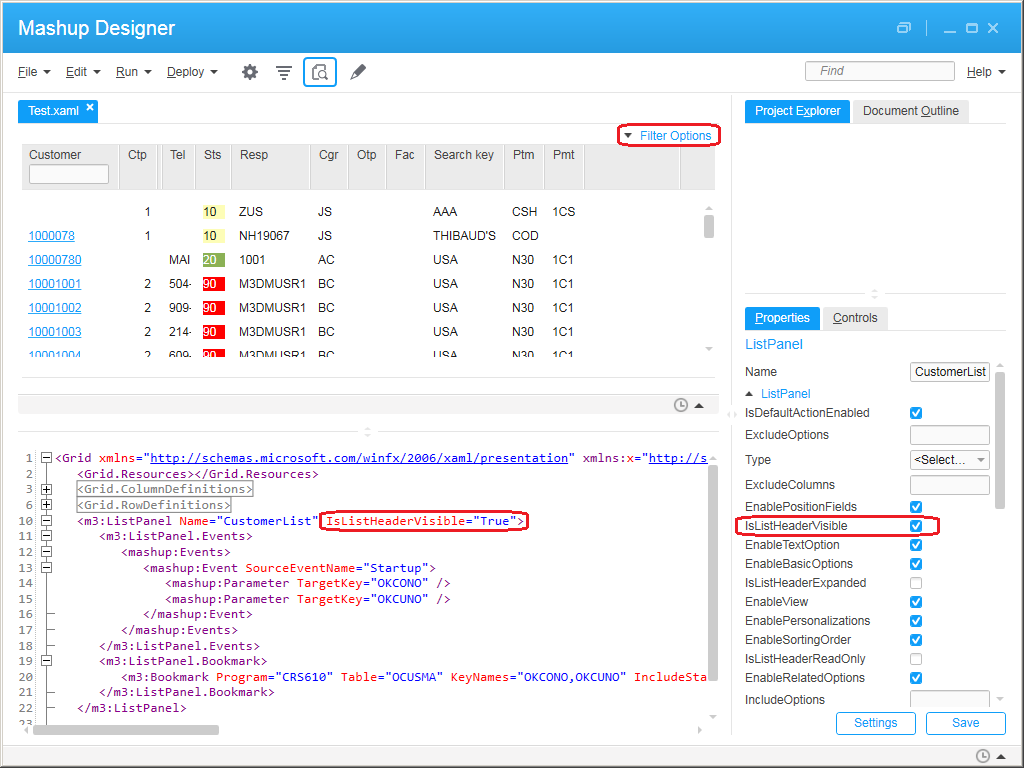
As a sample rule, I want all the <m3:ListPanel> controls to have the property IsListHeaderVisible=”True” such that users have the ability to expand the list header and change the sorting order, view, and apply filters. If one of the list panels does not have that property I want to know about it and correct it. Note this is my own preference, and other developers may have the opposite preference.

Here is the property in Mashup Designer:
3

The following XPath expression will return the list panels not validating the rule:

//m3:ListPanel[not(@IsListHeaderVisible="True")]

Here is a Python code to validate that rule:

import os
import glob
import lxml.etree as etree

for f in glob.glob(os.path.join(r'C:\RentalCounterMashup', '*.xaml')):
    tree = etree.parse(f)
    r = tree.xpath('//m3:ListPanel[not(@IsListHeaderVisible="True")]', namespaces={'m3': 'clr-namespace:MForms.Mashup;assembly=MForms'})
    for element in r:
        print(f, element.attrib['Name'])

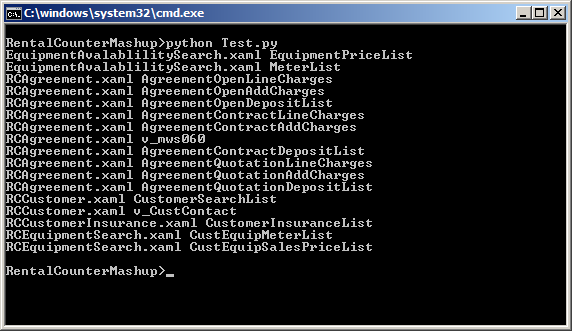
The result is the following, a list of XAML filenames and <m3:ListPanel> names that fail the rule:
4

Result

In my example, out of 63 list panels, 46 had the property, and 17 were missing the property, that’s 27% of list panels not passing the quality control. In other words, I was able to quickly identify a third of the list panels to correct.

Future work

I have many more ideas to implement, for example:

  • Ensure there are no hard-coded values in the MForms Bookmarks, Links, and MForms Automation, such as hard-coded CONO or DIVI
  • Automatically correct the Mashup, e.g. set IsListHeaderVisible=”True” if missing, and save

That’s it!

Let me know in the comments below if you have other rules to control the quality of Mashups.

Please click Like, share this post with your colleagues, click Follow to subscribe, come write the next blog post with us, and send some love to the other M3 blogs as well. This is a volunteer-based community, and your participation keeps the community alive and growing. Thank you.

Related posts

Who is the author of an M3 mod?

Today I needed to find who is the developer of an M3 customer modification. There is a bug in the MForms Bookmark of program M3 Customer. Connect Addresses – OIS002 which the developer modified for our customer’s needs, and I needed to report the bug to that developer. But I do not have the MAK training nor tool, so I cannot easily see the list of modifications and their authors. My colleague Shashank remind me of the following answer in M3 Server View.

  1. Go to M3 Server View (from the Grid Management Pages, or from LifeCycle Manager):
    0
  2. Find the interactive subsystem that is running the program (in my case OIS002), and select Tools:
    1
  3. Select Find Class:
    2
  4. Search for the M3 program (in my case OIS002):
    3
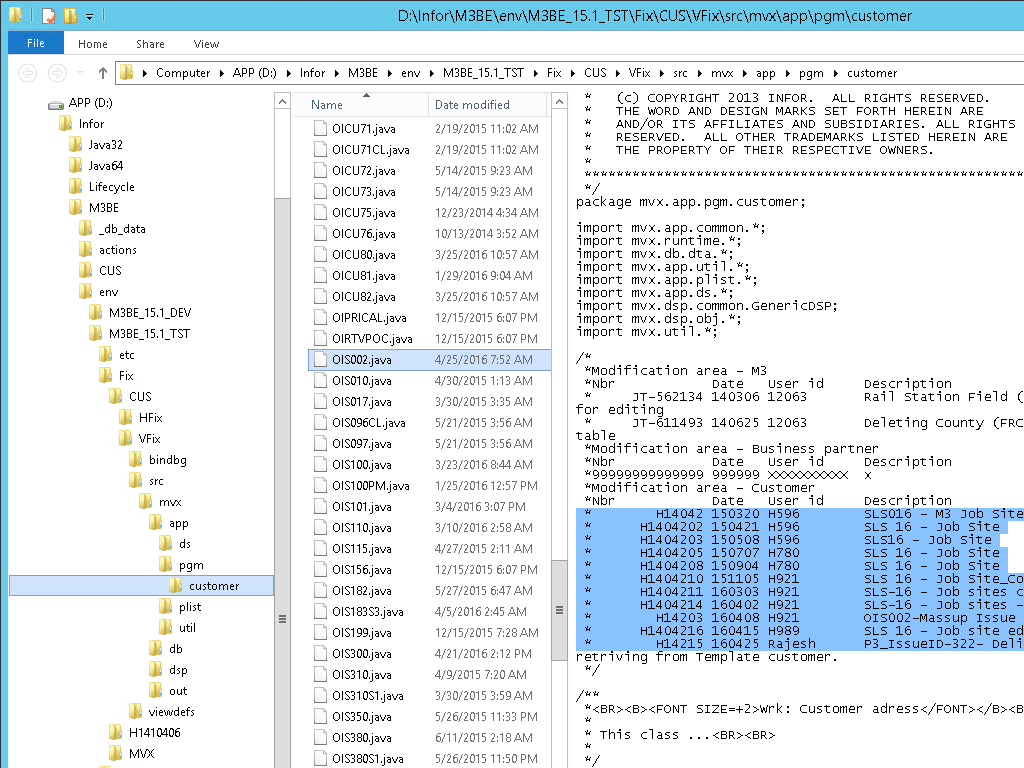
  5. The line with the customer class will give the file path, version, author, date, and unique ID (in my case I found the author, Rajesh):
  6. Note: Up to here, we can access this page anonymously, without being an authenticated user nor an administrator (security vulnerability anyone?)
  7. Now, if we have access to the M3 Business Engine file system, we can open the file itself and see the full list of developers; in my case the file is at:
    D:\Infor\M3BE\env\M3BE_15.1_TST\Fix\CUS\VFix\src\mvx\app\pgm\customer\OIS002.java:
    5

That’s it.

Let me know in the comments below if you have other tips. Click Like. Share this post with your colleagues. Click Follow to subscribe. And come write the next blog post with us. This is a volunteer-based community, and your participation keeps this blog going. And send some love to the other M3 blogs too. Thank you.

Inspect tool for Mashups

How great the Inspect tool is for developing Mashups in Infor Smart Office! I mentioned it a long time ago in another post about developing scripts, and I want to mention it here again.

I am currently maintaining a Mashup that other developers created. That Mashup has 30 XAML files, 10,000 lines of code, 500 controls, 80 tabs in three levels, etc. Any time I need to modify the Mashup, I have to follow a thread to find the relevant line of source code.

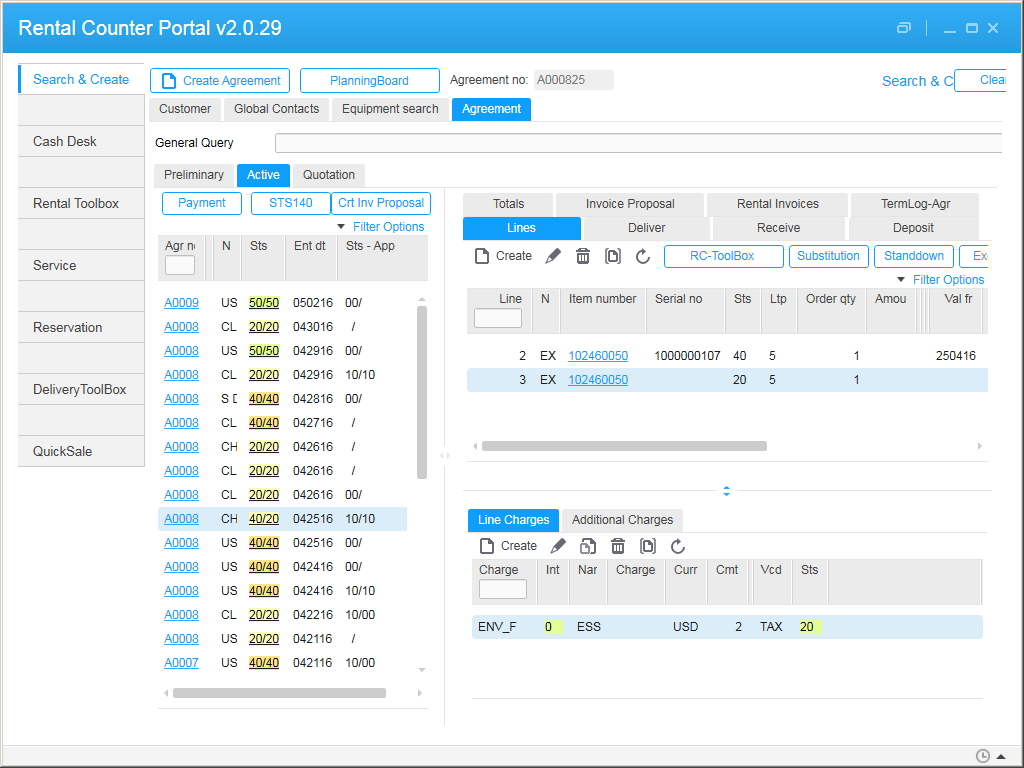
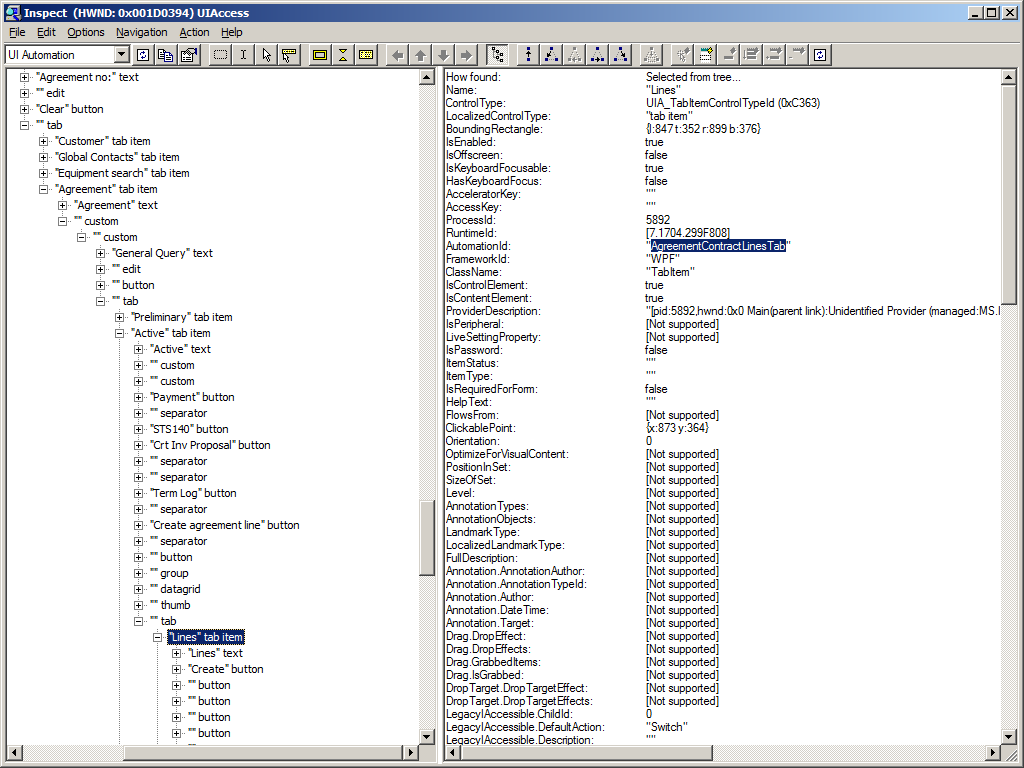
With the Inspect tool, I can point at a control in the Mashup (watch cursor) to find any of its parts, find its name, its parent tab, its XAML file, etc. That saves me valuable time.

Here are some screenshots:
1 2 3

I wish the Mashup Designer had the same watch cursor feature. Maybe it is easy to implement with the Smart Office SDK. To be explored.

There is also the Snoop tool I mentioned in the other post. Try that too.

That’s it!

Let me know in the comments below what other tools you use. Share this post. Click Like. Follow this blog. And come write the new blog post with us. This is a volunteer-based community, and your participation keeps it going. Thank you.

Default country in Mashup ComboBox

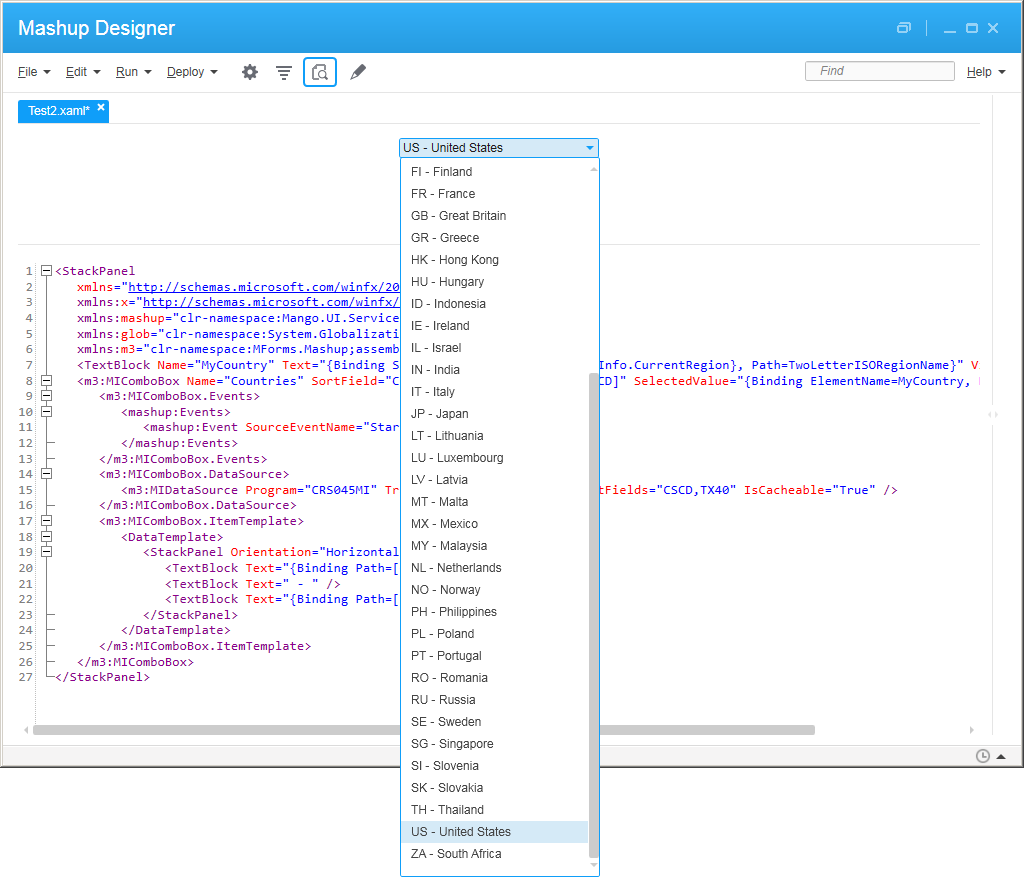
Quick illustration of how to set the user’s country as the default selection in a Mashup ComboBox in Infor Smart Office.

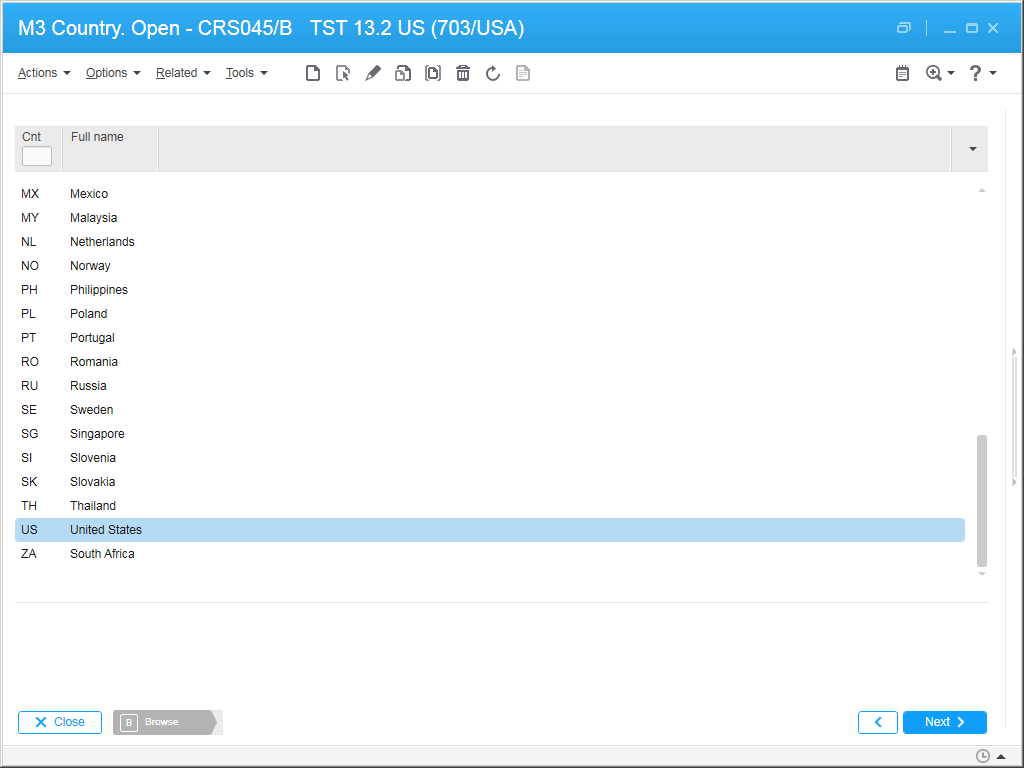
Suppose you have a <m3:MIComboBox>, and you want it to be a list of countries (e.g. FR-France, SE-Sweden, US-United States, etc.), populated from the M3 API CRS045MI.LstByCode, displaying CSCD and TX40, and you want the default selection to be the user’s country (e.g. US).

For that, I will use the System.Globalization.RegionInfo.CurrentRegion’s property TwoLetterISORegionName and assume that CRS045 uses the same two-letter ISO codes.

Here is the code with the relevant lines:

<StackPanel
   xmlns="http://schemas.microsoft.com/winfx/2006/xaml/presentation"
   xmlns:x="http://schemas.microsoft.com/winfx/2006/xaml"
   xmlns:mashup="clr-namespace:Mango.UI.Services.Mashup;assembly=Mango.UI"
   xmlns:glob="clr-namespace:System.Globalization;assembly=mscorlib"
   xmlns:m3="clr-namespace:MForms.Mashup;assembly=MForms">
    <TextBlock Name="MyCountry" Text="{Binding Source={x:Static glob:RegionInfo.CurrentRegion}, Path=TwoLetterISORegionName}" Visibility="Hidden" />
    <m3:MIComboBox Name="Countries" SortField="CSCD" SelectedValuePath="[CSCD]" SelectedValue="{Binding ElementName=MyCountry, Path=Text}" Width="200">
       <m3:MIComboBox.Events>
          <mashup:Events>
             <mashup:Event SourceEventName="Startup" />
          </mashup:Events>
       </m3:MIComboBox.Events>
       <m3:MIComboBox.DataSource>
          <m3:MIDataSource Program="CRS045MI" Transaction="LstByCode" OutputFields="CSCD,TX40" IsCacheable="True" />
       </m3:MIComboBox.DataSource>
       <m3:MIComboBox.ItemTemplate>
          <DataTemplate>
             <StackPanel Orientation="Horizontal">
                <TextBlock Text="{Binding Path=[CSCD]}" />
                <TextBlock Text=" - " />
                <TextBlock Text="{Binding Path=[TX40]}" />
             </StackPanel>
          </DataTemplate>
       </m3:MIComboBox.ItemTemplate>
    </m3:MIComboBox>
 </StackPanel>

Here is the result:
blog

blog_

That’s it. Please like, share, subscribe, author.

Poll: How to add 80 million item/warehouse records in M3?

My customer is doing data conversion in preparation for go live, of which 80 million item/warehouse records, they want to complete the upload over a week-end, but M3 is being a bottleneck, i.e. it cannot absorb the data as fast as they are feeding it to.

What would you do? I am not an expert at item/warehouse, nor at M3 performance, and from what I have seen in the past, each project handles it at their own sauce.

Synopsis

My customer has about 80,000 items to add to MMS001, and each item needs to be connected to about 1,000 warehouses in MMS002.

The result is about 80 million item/warehouse records to create.

M3 can handle gazillions of records. So this should be a piece of cake, right?

Failed tentative 1

Because the M3 API MMS200MI does not cover all the fields, my customer initially used M3 Web Services (MWS) of type M3 Display Program (MDP) to simulate a user entering data in all the desired fields.

It takes about 10ms per record, or 100 records per second. Loop 80 million times, and that would take about 800ks, which is about 222h, which is about 10 days to complete.

Yikes!!! 10 days to upload???

We need faster. We need one or two orders of magnitude faster.

Failed tentatives 2, 3, 4

I did A/B testing of various alternatives:

  • Use MWS MDP, versus use M3 API (I thought this would be the silver bullet, nope)
  • Create the item from scratch, versus create the item from an item template
  • Call the Add transaction, versus call the Copy transaction
  • Let M3 auto-create (we create the item oursleves but let M3 auto-create the item/warehouse), versus manually create (we create both ourselves).
  • Remote Desktop Connect inside the M3 BE server or database server to avoid any potential network issues
  • etc.

Either way, we only get a marginal, insignificant benefit in some cases, but the order of magnitude is equally bad.

Concurrency

Then, I decided to create the records concurrently (in parallel) rather than sequentially (one after the other).

With the help of some command line Kung fu I was able to automatically split my big CSV file into 80 smaller chunks, create 80 M3 Data Import (MDI) descriptions, and run 80 parallel threads that each upload one million records:
poll2

It turns out M3 can comfortably handle the throughput. It created many jobs in the API subsystem to process the records in parallel:
poll

Each job takes about 1% CPU. So that should max out the server to about 80% CPU utilization.

However, M3 seems to have capped well before the 80 jobs. I guess that is Amdahl’s law of maximum expected performance in parallel computing.

The result was about 1,100 records per second, which would complete in about 20h, less than a day. That is one order of magnitude improvement!!!

With some more benchmarking we could plot the curve of Amdahl’s performance and find the optimum number of jobs and have a pretty accurate estimate of the expected duration.

I also automatically generated a cleanup script that deletes everything, and I noticed the delete takes four times longer than the add.

Reality check

By the time I had come up with my results, the customer had completely changed strategy and decided to upload the records directly with SQL INSERT. [Cough] [Cringe] <your reaction here>. They consulted with some folks at Infor, and apparently it is OK as long as the data has been pre-validated by API or by MWS MDP, and as long as M3 is shut down to avoid collisions with the M3 SmartCache. It is important to get clearance from Infor as SQL INSERT will void your Infor Support warranty.

Future work

I have also heard of the Item Data Interface (IDI) and the Warehouse Interface (WHI). I do not know if those could help. To be explored.

Poll

What would you do? How have you uploaded millions of records at once? Leave me a comment below.

Disclaimer

Do not take these results as a reference. I was just providing some help to my customer and to the colleagues that are handling this.

I am not a reference for item/warehouse in M3, and I am not a reference for M3 performance, there are special teams dedicated to each.

Also, these results are specific to this customer at this time. Results will vary depending on many factors like CPU, memory, disk, tweaks, etc.

Custom UI for MEC

Here is how to create a custom user interface for M3 Enterprise Collaborator (MEC) in the Infor Grid.

The problem

At my current customer, users create purchase orders like this: a buyer creates a purchase order in PPS170/PPS200, then M3 sends an MBM document to MEC, and then MEC sends a cXML PunchOut OrderRequest to the supplier. For some reason PPS200 does not allow changing the status of an order then, so MEC cannot give feedback to the buyer that the supplier acknowledged the order or that there was an error, i.e. the buyer does not know the outcome. The workaround is to setup error handling to have MEC send an email to an administrator in case of error, and the administrator to tell the buyer. But it is a poor design because it is a negative goal – it informs the user only in the absence of acknowledgment – it is a weak link – the administrator may or may not inform the buyer – and it is reactive, not pro-active.

A solution

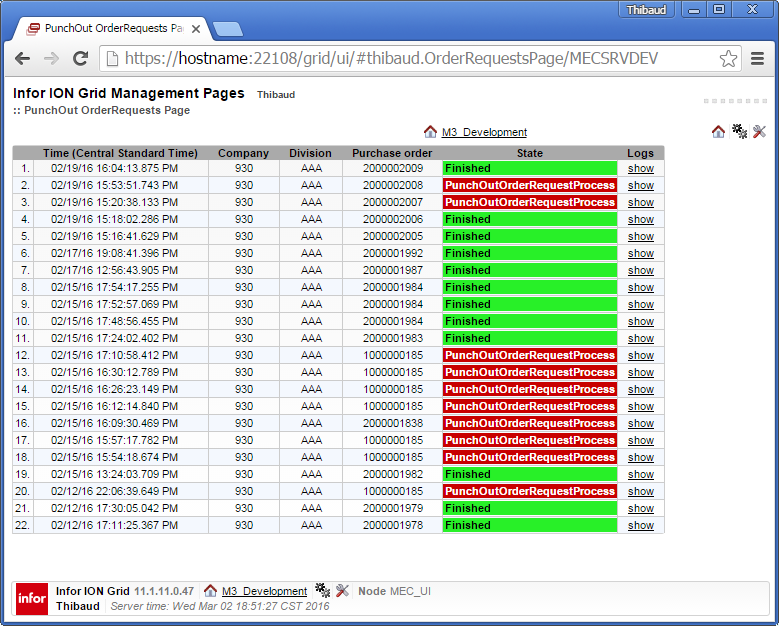
Instead, I will build a custom page that shows the status of the outgoing purchase orders in MEC, with timestamp, company CONO, division DIVI, and purchase order number PUNO, I will give access to M3 users, and I will place it as a shortcut in PPS200. It will be a useful feedback loop for end-users. It is not as tight a loop as I would like it to be, but at least buyers will be able to verify the status of their orders on their own.

Inspiration

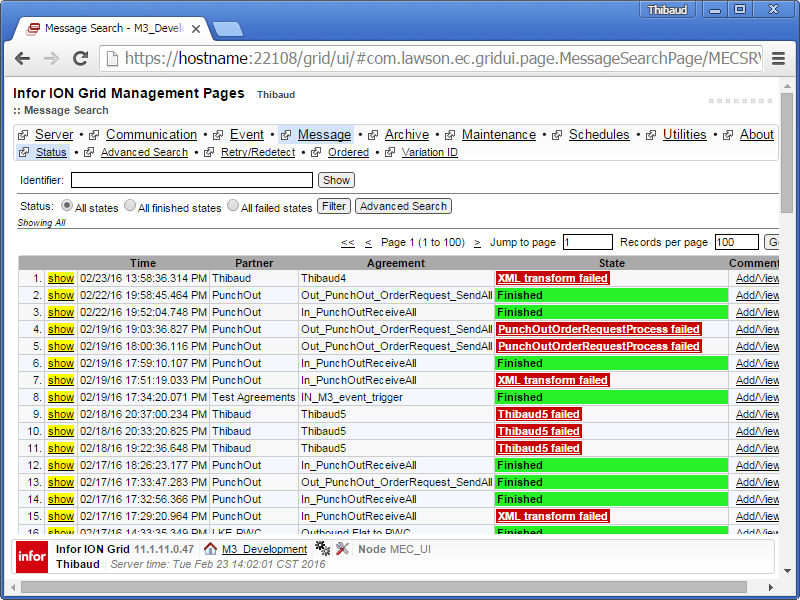
I was inspired by the MessageSearchPage of the Infor ION Grid Management Pages > MEC_UI:1
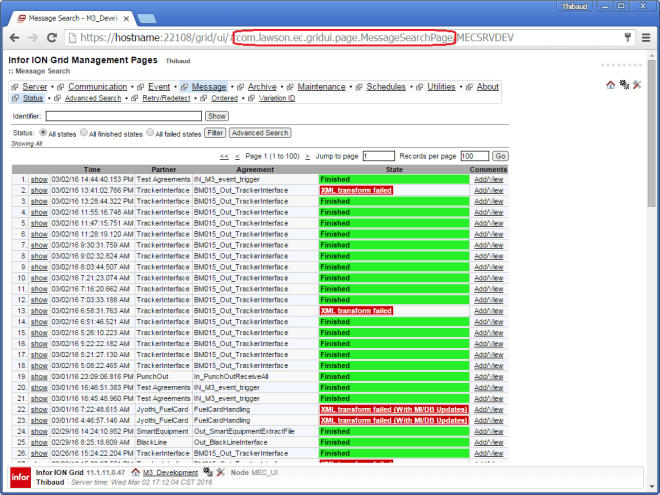
I decompiled the ec-gridui-x-y-z.jar file to see how it builds the contents of the page:

and to see how StateQuery gets the data from the MEC database:
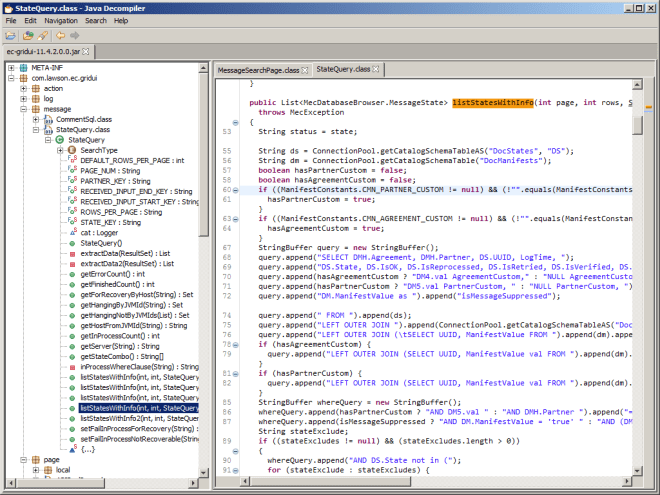
3

My own content

The mapping adds the CONO, DIVI, and PUNO to the manifest in a Java function with:

setManifestInfo("map:keyValue1", CONO);
setManifestInfo("map:keyValue2", DIVI);
setManifestInfo("map:keyValue3", PUNO);

I prepared an SQL query that gets the status of the outgoing purchase orders with the CONO, DIVI and PUNO from the MEC manifests:
4

HelloWorld Page

Here is a simple page:

package thibaud;

import com.lawson.grid.ui.framework.PageProvider;
import com.lawson.grid.ui.framework.UIRequest;
import com.lawson.grid.ui.framework.UIResponse;
import com.lawson.grid.ui.meta.widget.Page;

public class HelloPage implements PageProvider {
    public Page getPage(UIRequest request, UIResponse response) {
        Page p = new Page("Hello Page");
        p.add("Hello, World!");
        return p;
    }
}

I drop the class in the custom folder of the MEC Grid server at:

D:\Infor\LifeCycle\?\grid\?\grids\?\applications\MECSRV\MecServer\custom\
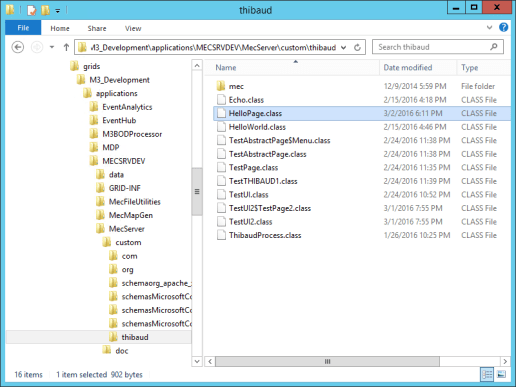
5

Without restarting the server, I access the page at https://hostname:22108/grid/ui/#thibaud.HelloPage/MECSRVDEV:
6

I add the usual UI widgets: labels, buttons, images, table, links, etc.:
8

I restrict access to authenticated users by adding this annotation:

@Session

I can also restrict access to a specific Grid role mapping, such as app-user, or to my own role PunchOut that I would have to create and assign users to:

@Session(roles={"app-user"}) // MECSRVDEV/app-user
@Session(roles={"PunchOut"}) // MECSRVDEV/PunchOut

When I modify the class file, I stop and start the MEC_UI node:
7

Result

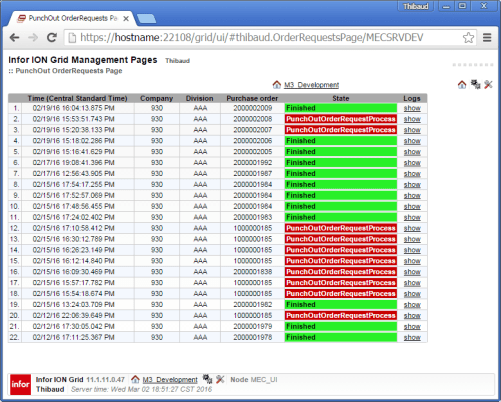
Here is the result of my page; it is similar to the built-in MessageSearchPage, but it is filtered to show outgoing purchase orders only, with additional columns company CONO, division DIVI, and purchase order number PUNO, and it is accessible by end users, except the link to the logs which is for administrators:
Full source code

Here is the full source code of my page; this code is more recent than the older screenshot above, and the code is not finished, but it is a start for you:

package thibaud;

import java.io.UnsupportedEncodingException;
import java.net.MalformedURLException;
import java.net.URL;
import java.net.URLEncoder;
import java.sql.Connection;
import java.sql.ResultSet;
import java.sql.SQLException;
import java.sql.Statement;
import java.util.Date;
import java.util.TimeZone;
import com.intentia.ec.db.ConnectionPool;
import com.lawson.ec.gridui.PropertiesSourceFactory;
import com.lawson.ec.gridui.page.MessageDetailPage;
import com.lawson.ec.gridui.page.ViewFilePage;
import com.lawson.ec.gridui.page.ViewMessageLogsPage;
import com.lawson.ec.gridui.util.DateUtility;
import com.lawson.grid.proxy.access.Session;
import com.lawson.grid.ui.framework.PageProvider;
import com.lawson.grid.ui.framework.UIRequest;
import com.lawson.grid.ui.framework.UIResponse;
import com.lawson.grid.ui.meta.widget.Label;
import com.lawson.grid.ui.meta.widget.Link;
import com.lawson.grid.ui.meta.widget.Page;
import com.lawson.grid.ui.meta.widget.URLLink;
import com.lawson.grid.ui.meta.widget.WidgetTable;
import com.lawson.grid.ui.meta.widget.iface.Container;
import com.lawson.grid.ui.meta.widget.iface.Param;
import com.lawson.grid.ui.meta.widget.iface.StyledText;
import com.lawson.grid.util.logging.GridLogger;

@Session
public class OrderRequestsPage implements PageProvider {

	static GridLogger cat = GridLogger.getLogger(OrderRequestsPage.class);

	public Page getPage(UIRequest request, UIResponse response) {

		// prepare the results table
		Page p = new Page("PunchOut OrderRequests Page");
		WidgetTable table = new WidgetTable();
		table.setHeaders(new String[] { "", "Time (" + TimeZone.getDefault().getDisplayName() + ")", "Company", "Division", "Purchase order", "State", "Message Details", "Message Logs", "MBM identifier", "cXML OrderRequest", "Response" /*, "IsOK", "IsReprocessed", "IsRetried", "IsVerified", "IsWaiting", "IsRecoverable"*/ });
		table.setColumnAlignment(new Container.HAlign[] {
			Container.HAlign.RIGHT,   // #
			Container.HAlign.LEFT,    // Time
			Container.HAlign.CENTER,  // Company
			Container.HAlign.CENTER,  // Division
			Container.HAlign.CENTER,  // Purchase order
			Container.HAlign.LEFT,    // State
			Container.HAlign.CENTER,  // Message Details
			Container.HAlign.CENTER,  // Message Logs
			Container.HAlign.LEFT,    // MBM identifier
			Container.HAlign.CENTER,  // cXML OrderRequest
			Container.HAlign.CENTER,  // Response
		});
		table.setBorderStyle(Container.BorderStyle.SOLID_WEAK);
		table.setAutoSequenceRowHighlight(WidgetTable.RowHighlight.BLUE_WEAK);
		p.add(table);

		// build the query
		String query =
			"SELECT DISTINCT TOP 100\n" +
				"H.UUID,\n" +
				"S.LogTime,\n" +
				"M1.ManifestValue AS CONO,\n" +
				"M2.ManifestValue AS DIVI,\n" +
				"M3.ManifestValue AS PUNO,\n" +
				"M4.ManifestValue AS mbmIdentifier,\n" +
				"M5.ManifestValue AS FilePath,\n" +
				"S.State,\n" +
				"S.IsOK,\n" +
				"S.IsReprocessed,\n" +
				"S.IsRetried,\n" +
				"S.IsVerified,\n" +
				"S.IsWaiting,\n" +
				"S.IsRecoverable\n" +
			"FROM\n" +
				"dbo.DocManifestsHeader AS H,\n" +
				"dbo.DocStates AS S,\n" +
				"dbo.DocManifests AS M1,\n" +
				"dbo.DocManifests AS M2,\n" +
				"dbo.DocManifests AS M3,\n" +
				"dbo.DocManifests AS M4,\n" +
				"dbo.DocManifests AS M5\n" +
			"WHERE H.UUID=S.UUID AND S.UUID=M1.UUID AND M1.UUID=M2.UUID AND M2.UUID=M3.UUID AND M3.UUID=M4.UUID AND M4.UUID=M5.UUID\n" +
				"AND Partner='PunchOut' AND Agreement='Out_PunchOut_OrderRequest_SendAll'\n" +
				"AND M1.Name='map:keyValue1'\n" +
				"AND M2.Name='map:keyValue2'\n" +
				"AND M3.Name='map:keyValue3'\n" +
				"AND M4.Name='mvx:mbmIdentifier'\n" +
				"AND M5.Name='map:keyValue4'\n" +
			"ORDER BY LogTime DESC\n";

		query = query.replace("dbo.", ConnectionPool.getCatalogSchema());
		cat.debug(query);

		Connection con;
		Statement stmt;
		ResultSet rs;
		try {
			// execute the query
			con = ConnectionPool.getConnection();
			stmt = con.createStatement();
			rs = stmt.executeQuery(query);
			// render the result
			int row = 0;
			while (rs.next()) {
				String uuid = rs.getString("UUID");
				// row number
				table.setData(row, 0,  "" + (row + 1) + ".");
				// time
				Date date = new Date(rs.getLong("LogTime"));
				table.setData(row, 1,  DateUtility.getFormattedDate(date));
				// CONO
				String CONO = rs.getString("CONO");
				table.setData(row, 2,  CONO);
				// DIVI
				table.setData(row, 3,  rs.getString("DIVI"));
				// PUNO
				String PUNO = rs.getString("PUNO");
				try {
					String CONO_ = URLEncoder.encode(CONO, "UTF-8");
					String PUNO_ = URLEncoder.encode(PUNO, "UTF-8");
					String bookmark = "mforms://bookmark/?program=PPS200&tablename=MPHEAD&panel=B&includestartpanel=True&requirepanel=True&suppressconfirm=False&sortingorder=1&view=STD01-01&keys=IACONO%2c" + CONO_ + "%2cIAPUNO%2c" + PUNO_ + "&fields=IAPUNO%2c" + PUNO_;
					URLLink bookmarkLink = new URLLink(new URL(bookmark), PUNO); // PENDING
					table.setData(row, 4,  bookmarkLink);
				} catch (UnsupportedEncodingException e) {
					table.setData(row, 4,  PUNO);
				} catch (MalformedURLException e) {
					table.setData(row, 4,  PUNO);
				}
				// State...
				String state = rs.getString("State");
				int isOK = rs.getInt("IsOK");
				StyledText.Category c;
				if (isOK == 0) {
					c = StyledText.Category.ERROR;
				} else {
					c = StyledText.Category.OK;
				}
				table.setData(row, 5,  new Label(state,  StyledText.Size.NORMAL, StyledText.Style.BOLD, c));
				// Message Details
				Link messageLink = new Link("show", MessageDetailPage.class, new Param[] { new Param("uuid", uuid) });
				messageLink.setOpenInNewWindow(true);
				table.setData(row, 6,  messageLink);
				// Message Logs
				Link eventLink = new Link("show", ViewMessageLogsPage.class, new Param[] { new Param("uuid", uuid) });
				eventLink.setOpenInNewWindow(true);
				table.setData(row, 7,  eventLink);
				// MBM identifier; PENDING: see com.lawson.ec.gridui.page.MessageDetailPage.getAllData(String uuid)
				table.setData(row, 8,  rs.getString("mbmIdentifier"));
				// cXML OrderRequest
				String host = PropertiesSourceFactory.getInstance().getProperties().getProperty("Server.Context");
				cat.debug(host);
				String filepath = rs.getString("FilePath");
				Link xmlLink = new Link("show", ViewFilePage.class, new Param[] { new Param("host", host == null ? "local" : host), new Param("type", "xml"), new Param("path", filepath) });
				xmlLink.setOpenInNewWindow(true);
				table.setData(row, 9,  xmlLink);
				// cXML response
				table.setData(row, 10,  "PENDING");
				row++;
			}
			// cleanup
			rs.close();
			stmt.close();
			ConnectionPool.putConnection(con);
		} catch (SQLException e) {
			cat.error("SQLException when building PunchOut page", e);
			p.add(new Label("SQLException when building PunchOut page: " + e.getMessage()));
		}
					
		return p;
	}
}

Future work

Some ideas for future work are:

  • Tighten the loop even more, i.e. inform the user directly in PPS200 when they are creating the order
  • Get the state label; see com.lawson.ec.gridui.page.MessageSearchPage.getStateLabel()
  • Finish the MForms Bookmark link
  • Add a link to the MBM document (.rcv file)
  • Add a link to the cXML OrderRequest response received from the supplier
  • Register the page in the MEC menu
  • Get URL parameters from UIClientRequest
  • Add pagination, see com.lawson.ec.gridui.page.MessageSearchPage.buildPagingPanel()
  • Develop a Mashup that combines PPS200 and the SQL from MEC DB

Conclusion

That was a solution to develop custom UI pages for MEC; for example in my case a page for buyers to see the status of the outgoing purchase orders, with timestamp, company CONO, division DIVI, and purchase order number PUNO. It is a simple solution to provide feedback to end users so they can be pro-active and verify the outcome of their actions on their own.

That’s it.

Thanks for reading. Leave us a comment in the section below. And if you liked this, please subscribe, like, share, and come write the next blog post with us.

Easy export/import M3 with JavaScript 6

Last week I had to copy several M3 Supplier CRS620 records, from one company CONO into another company, and I found this elegant solution using JavaScript 6.

Classic approach

Traditionally, I would have used M3 API or SQL to export the records to a CSV file in my computer, change the company number, and use M3 Data Import (MDI) to import the CSV into the other company. But the API LstSuppliers does not output all the fields, so I would have had to use GetBasicData, record by record. It is trivial, but it is tedious because of the many steps and tools involved, and it is antiquated.

A new approach

Instead, I have been wanting to learn JavaScript 6 (ECMAScript 6th Edition), so I challenged myself to learn this new solution using the M3 API REST web service and ES6.

Using ES6 is elegant because the result is very concise (only two lines of relevant code), and it is very expressive using: arrow functions (the new anonymous functions), map/reduce and array comprehension, Promises (the new deferred; chaining, fluid programming), and the fetch API (the new XMLHttpRequest).

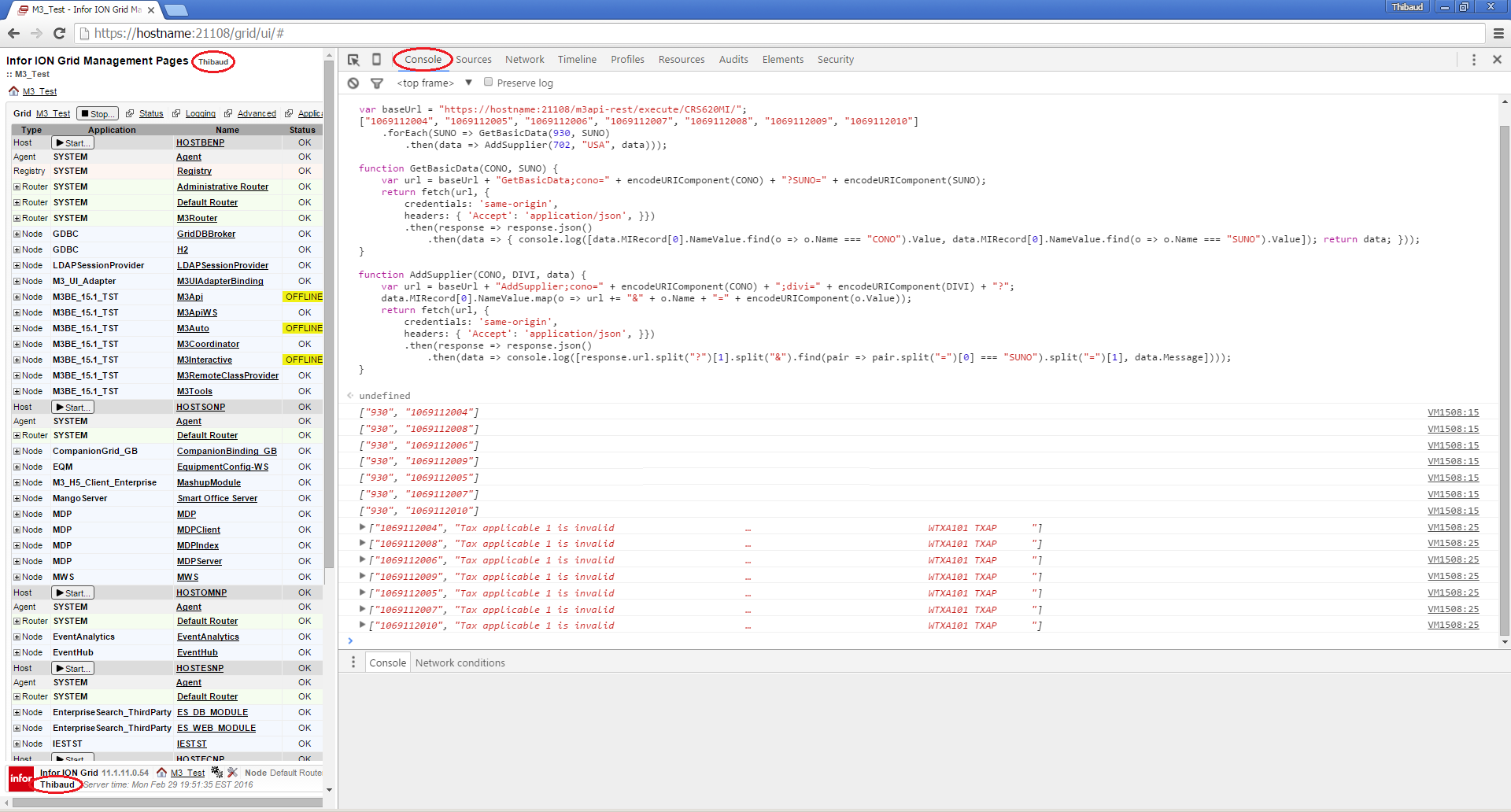
Here is the source code in ES6:

var baseUrl = "https://hostname:21108/m3api-rest/execute/CRS620MI/";
["1069112004", "1069112005", "1069112006", "1069112007", "1069112008", "1069112009", "1069112010"]
    .forEach(SUNO => GetBasicData(930, SUNO)
        .then(data => AddSupplier(702, "USA", data)));

function GetBasicData(CONO, SUNO) {
    var url = baseUrl + "GetBasicData;cono=" + encodeURIComponent(CONO) + "?SUNO=" + encodeURIComponent(SUNO);
    return fetch(url, {
        credentials: 'same-origin',
        headers: { 'Accept': 'application/json', }})
        .then(response => response.json());
}

function AddSupplier(CONO, DIVI, data) {
    var url = baseUrl + "AddSupplier;cono=" + encodeURIComponent(CONO) + ";divi=" + encodeURIComponent(DIVI) + "?";
    data.MIRecord[0].NameValue.map(o => url += "&" + o.Name + "=" + encodeURIComponent(o.Value));
    return fetch(url, {
        credentials: 'same-origin',
        headers: { 'Accept': 'application/json', }});
}

/*
optional:
console.log([data.MIRecord[0].NameValue.find(o => o.Name === "CONO").Value, data.MIRecord[0].NameValue.find(o => o.Name === "SUNO").Value]);
console.log([response.url.split("?")[1].split("&").find(pair => pair.split("=")[0] === "SUNO").split("=")[1], data.Message]);
*/

We have to run this in the JavaScript console of a browser that supports ES6 and the fetch API, such as Google Chrome, and we have to login to the Infor ION Grid Management Pages to have an authenticated session.

Here is the result:
result1

And we can inspect the request/responses in the network tab:result2

That’s it!

Thanks for reading. Leave us a comment in the section below. And if you liked this, please subscribe, like, share, and come write the next blog post with us.
Error handling in MEC

Here are several ways to handle errors in Infor M3 Enterprise Collaborator (MEC).

(Disclaimer: I have not been to a MEC training, so these are my own findings, not necessarily the official Infor recommendation.)

1. Message detail page

By default, errors in MEC are reported in MEC Management Pages > Message > Status > State; we can drill down to see the MessageDetailPage with the manifest, the input/output files of each process, and the status:
3_

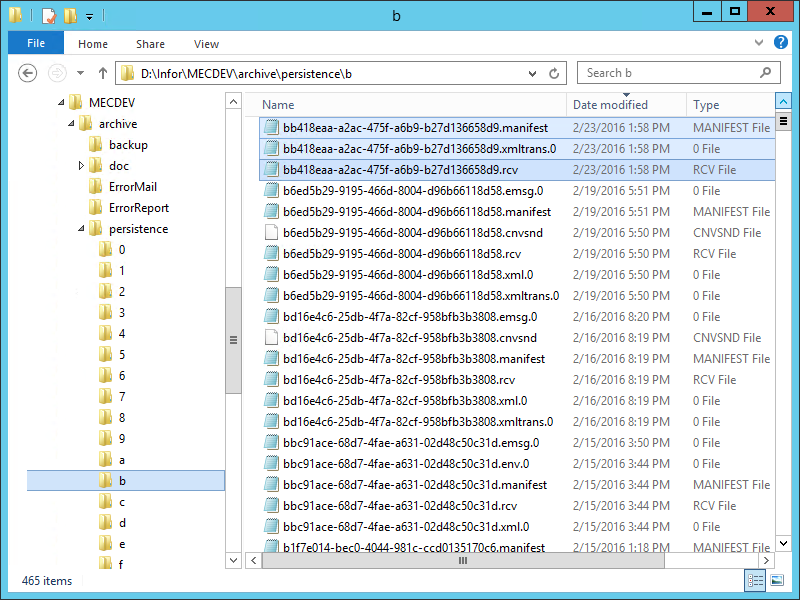
We can also go directly to the file system and get the manifest, and the input/output files of each process:
3c

This is sufficient for MEC administrators to troubleshoot.

But only users with the app-admin or grid-admin roles have access to this, and this is unannounced, so nobody will know there was an error unless somebody looks.

2. Retry/re-detect

The MessageDetailPage has buttons Retry to rerun from last failed process, and buttons Redetect to rerun from message detection:
9

If it helps, the MEC Fundamentals workbook says: “If an error occurs in an XMLTransform step, and Retry is selected, the Process starts with re-sending the input to the XMLTransform step. Meaning that the mapping is executed from the beginning.”

3. Event logs

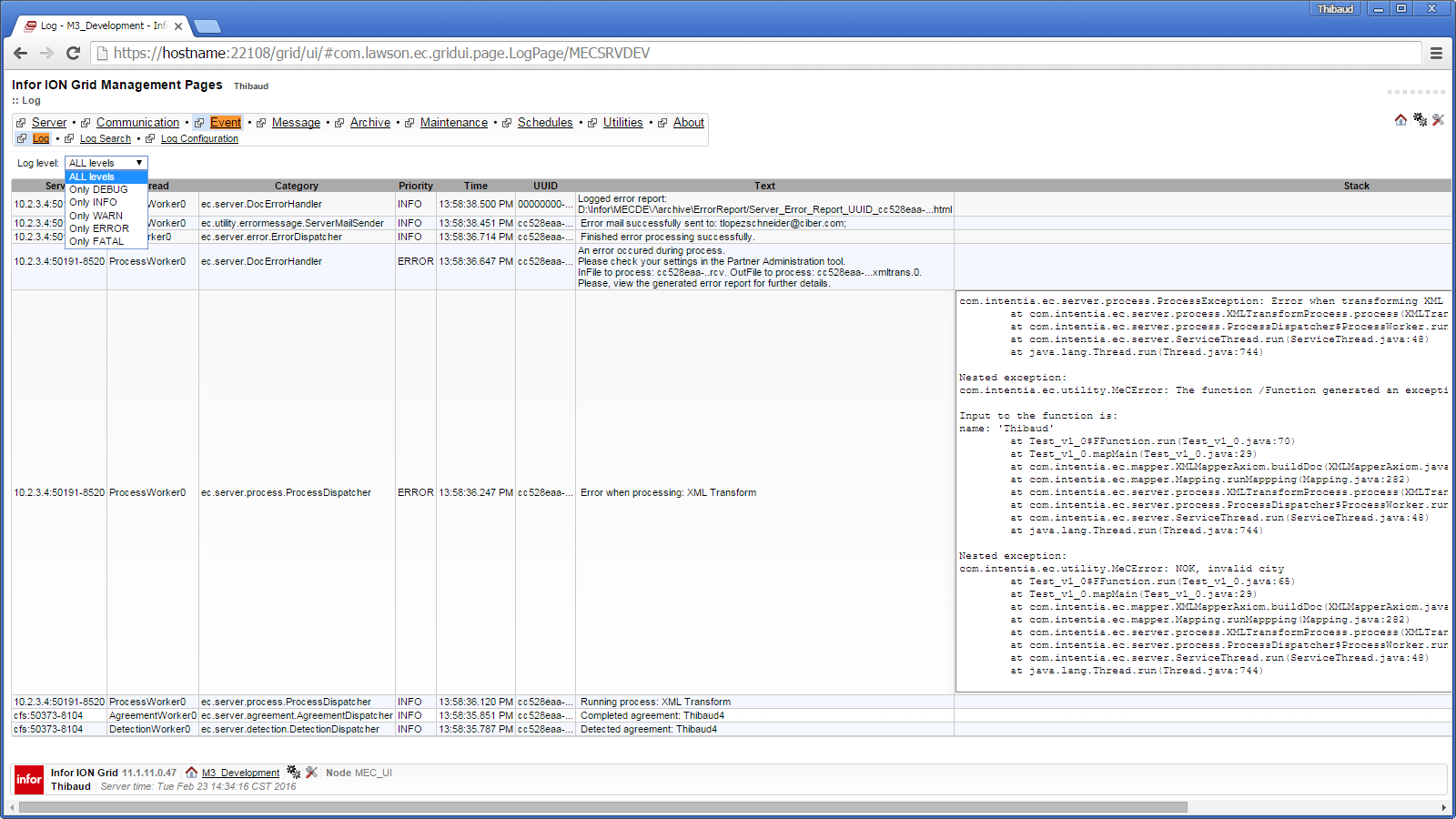
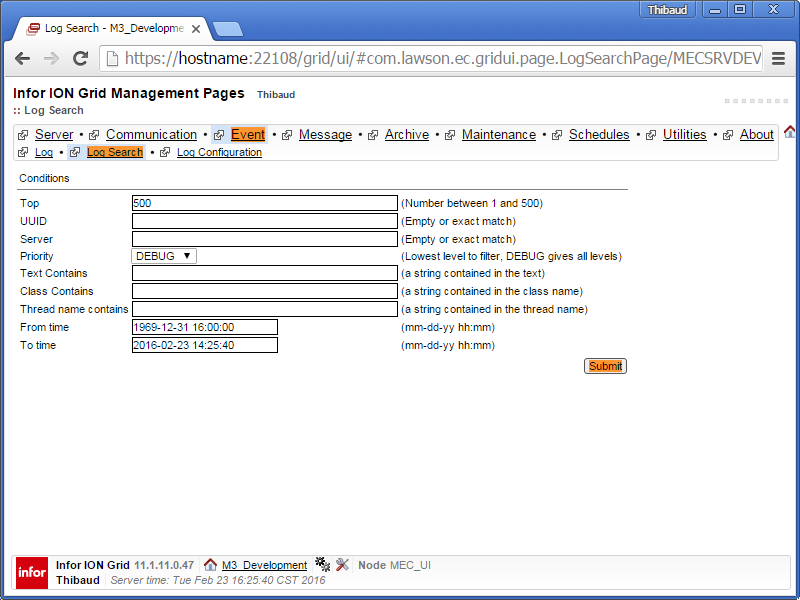
MEC also shows detailed event logs at MEC Management Pages > Event > Log; it uses the Apache Log4J logger with levels DEBUG|INFO|WARN|ERROR|FATAL; it has a search form to search by UUID, class, text, time, etc.; the loggers are configurable via the web form or via the log.config file; and the logs are persisted in the MecLog table of the MEC database:
4__ 4___ 4____ 4_

This shows many more details than the message detail page, most interestingly the DEBUG|TRACE  levels, and the Java stack trace.

4. Error reports

We can drill down the MessageDetailPage to see the HTML error report; it contains the Java stack trace:
3__

We can also get the error reports directly from the file system:
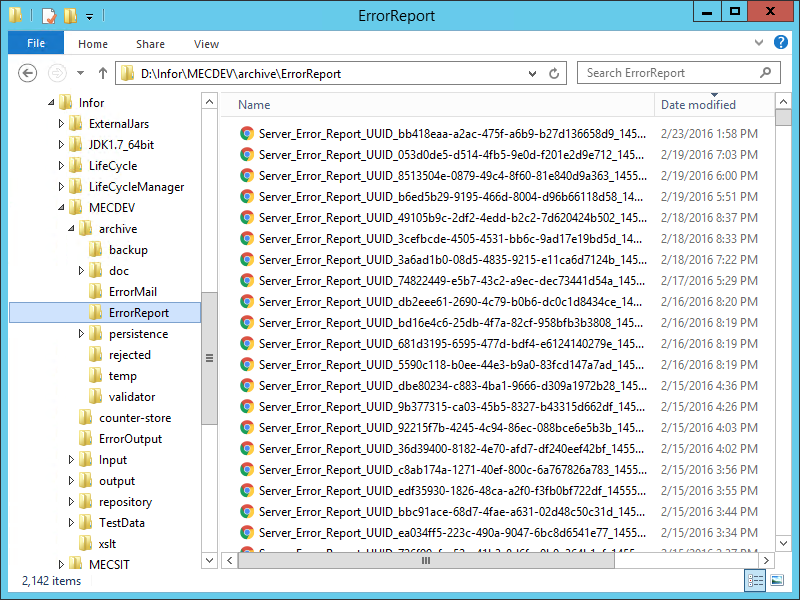
3___

We can also generate a zipped error report package, e.g. to send to Infor Support:

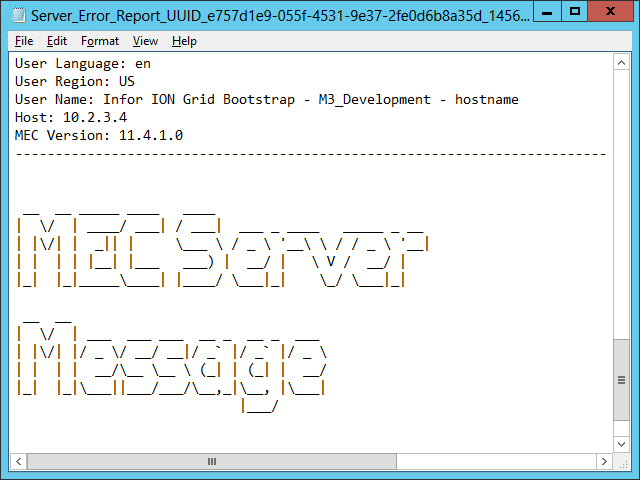
We can change the DocErrorHandler properties to change the XSLT that renders the report, or to change the error report to text format:
3____ 3_____ 3______

5. ErrorMail

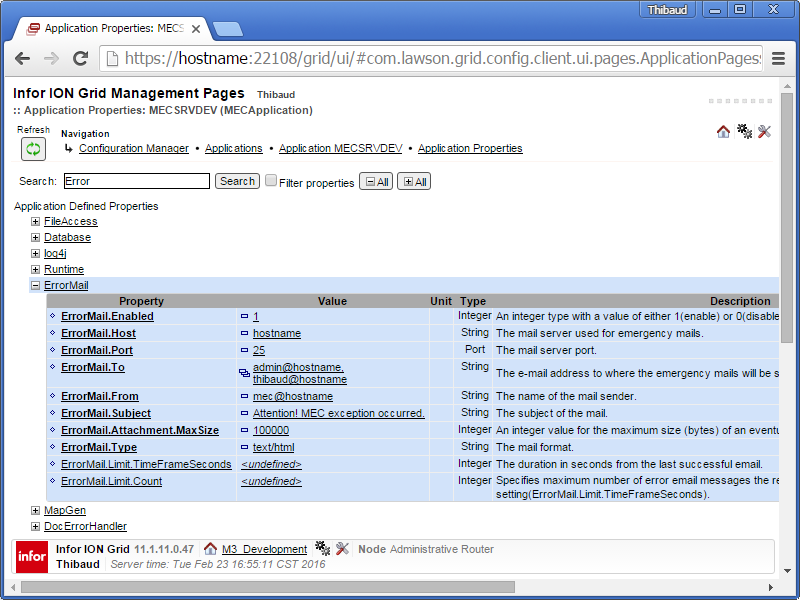
We can configure the ErrorMail properties in MEC to automatically send the error reports to a comma separated list of email addresses; the input file (.rcv) is zipped as an attachment:
5__

This is good to automatically notify administrators in case of errors, and it is great for deputies that don’t have the administrative privileges.

But the recipients risk receiving too many emails and becoming desensitized, resulting in the opposite intention.

6. Agreement Email

We can also set a comma separated list of email addresses in the agreement’s Basic tab, and MEC will send the error reports there instead:
6

This is good to delegate administration to the respective deputies of each agreement, instead of spamming the MEC administrators.

7. Mapping

If our mapping calls an M3 API and the API responds with an error, or if our mapping throws an exception, by default the mapping will stop and will call sendMail() to bubble up to the error report.

We can change this default behavior with the ErrorHandling property:

• Exit map on M3 NOK
• Exit loop on M3 NOK
• Ignore M3 NOK

1

And we can add a Java function that calls the methods isLastAPICallOK()hasNOKOccurred(), and getLastAPIMessage() of class com.intentia.ec.mapper.Mapping:

We can also throw an exception with throw new MeCError(“CRASH!”):
2_

All this to attempt recovering from errors, and to do our own error handling.

One of the MEC Development workbook exercises has the opinion that: “all API calls should have their ErrorHandling property set to “Ignore M3 NOK”to prevent the map from failing, and use method hasNOKOcurred() to determine if any API has returned NOK.”

Note: Sometimes it is desirable to produce a specific error output. However, mappings are unable to produce an output other than the XML schema they were designed for, i.e. there is no secondary schema we can output in case of error. The workaround is to do the error handling offline, e.g. build a custom error report and send it in a custom email.

I can summarize it like this:

// default
if (OK) use output schema
else send error report

// desired, but not possible
if (OK) use output schema
else use error schema

// workaround
if (OK) use output schema
else do custom error handling

We can analyze the generated mapping source to have a better understanding:
7

8. Error handling tab

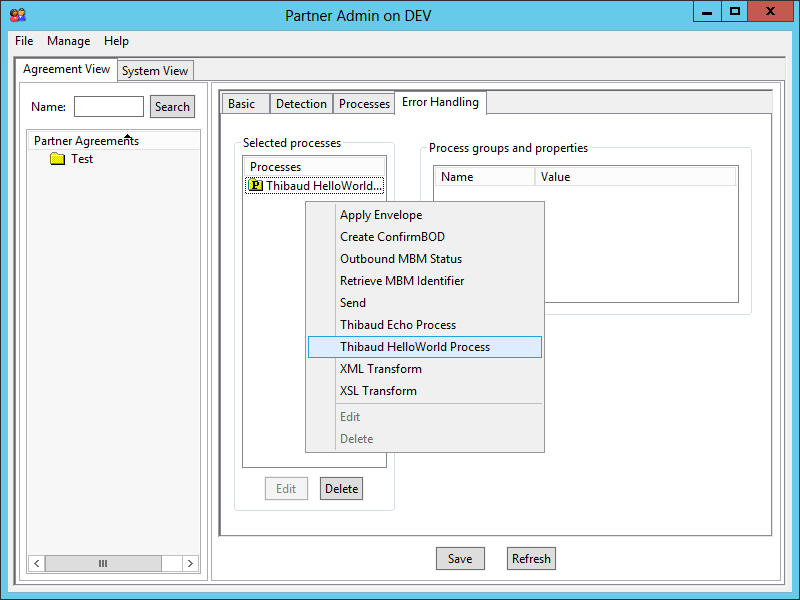
We can use the agreement’s Error Handling tab to handle the error with one or more of these processes:

  • Apply Envelope
  • Create ConfirmBOD
  • Outbound MBM Status
  • Retrieve MBM Identifier
  • Send
  • XML Transform
  • XSL Transform

8

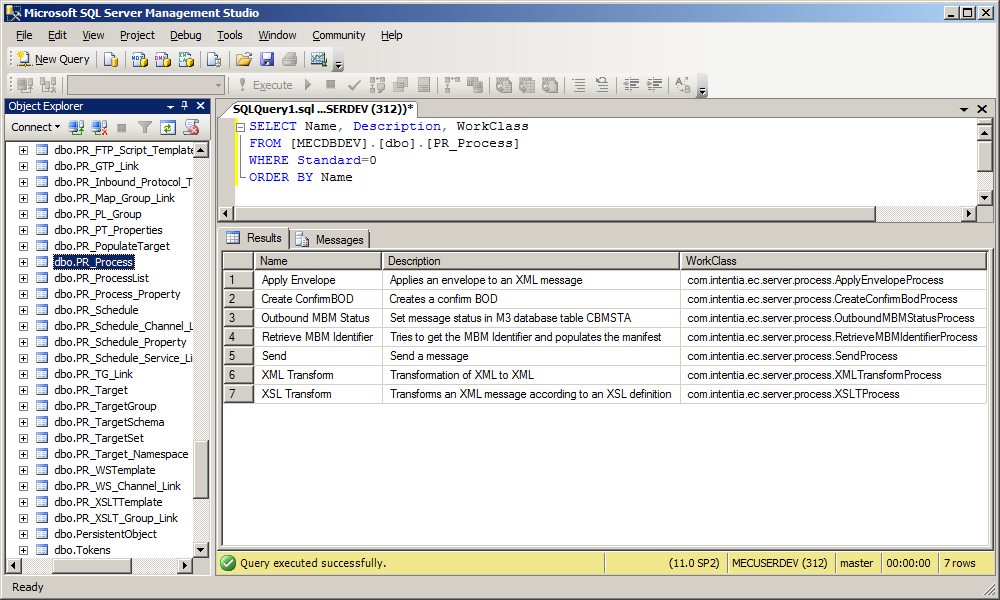
According to class ErrorTab, these processes are stored in table PR_Process with Standard=0, which gives us their class name:
8_ 8__

We can analyze the corresponding Java classes to understand what they do; they seem to made for peculiar requirements.

I created my own processes as illustrated in a previous post, and it works great:
8___

Future work

In the DocErrorHandler properties, there are some AdminException regex properties such that if an exception matches the regex, the DocErrorHandler will send the error report to both the email addresses set in the ErrorMail, and the email addresses set in the agreement. To be tested.

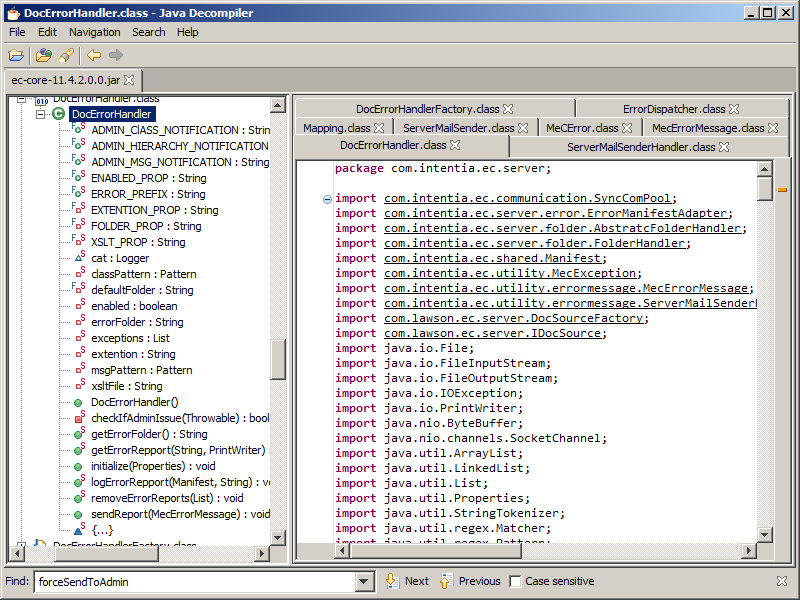
We can learn more about error handling in MEC by diving into ec-core-11.4.2.0.0.jar:
3b 3b_

Conclusion

There are several ways to handle errors in MEC:

  • Use the default message detail page, event logs, and error reports for the administrators to troubleshoot in detail, and eventually retry/re-detect
  • Set the ErrorMail and agreement email to automatically notify the deputies and delegate administration
  • Write custom Java code in the mappings to attempt recovering from errors and to do our own error handling
  • Develop our own error handling processes to have more control

That’s it!

Thanks for reading. If you liked this, please consider subscribing, give a like, leave a comment, share around you, and help us write the next post.

Call M3 API from MEC process

I had a requirement for one of my customers to call M3 API in Infor M3 Enterprise Collaborator (MEC) specifically from a custom process – not from a mapping – and I realized MEC does not have any built-in process for that, so I reverse engineered MEC again, and here is what I found.

Let’s see what MEC has to call M3 API from a process; I am using MEC version 11.4.1.

Processes

The Partner Admin has the following built-in processes:
3_

According to their Java source code, none of these processes calls M3 API, at least not that allow the user to call any M3 API arbitrarily; that does not meet my requirement.

API reference holders

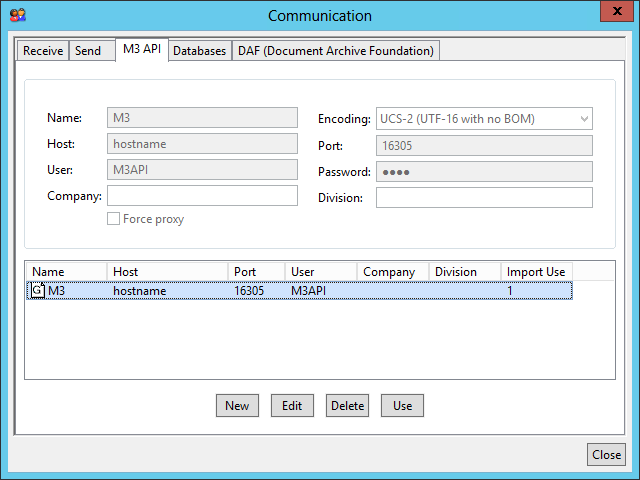
There is a list of API reference holders in Partner Admin > Manage > Communication > M3 API:
1

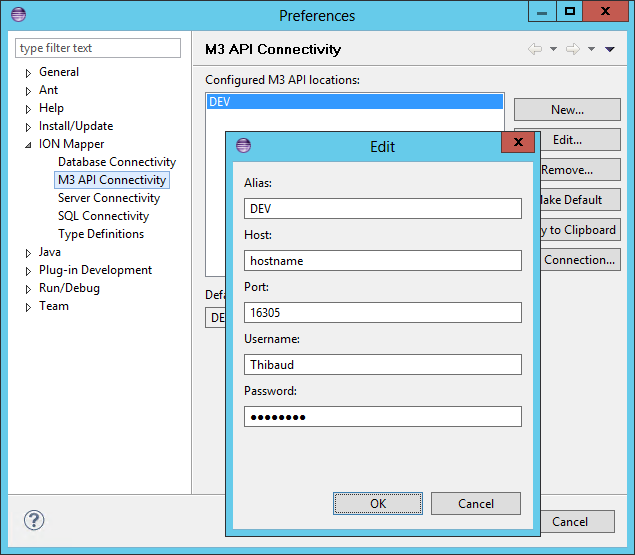
They are used by the mappings in the XML Transform processes to select the M3 API server at run time:
9

I can get these properties with the following code with ec-core-11.4.1.0.0.jar:

import com.lawson.ec.server.m3api.APIRef;
import com.lawson.ec.server.m3api.APIReferenceHolder;

APIReferenceHolder instance = APIReferenceHolder.getInstance();
List<APIRef> apiRefs = instance.getAPIRefs();
for (APIRef r: apiRefs) {
    String id = r.getId();
    String hostName = r.getHostName();
    String portNumber = r.getPortNumber();
    String username = r.getUsername();
    String password_ = r.getPassword();
    String encodingIANA = r.getEncodingIANA();
    boolean proxyUsage = r.isProxyUsage();
    String refName = r.getRefName();
    List<String> agreements = r.getAgreements();
}

Good.

Note: APIReferenceHolder will run an SQL to table PR_Basic_Property in the MEC database with PR_Basic_Group_Type.Type=’APIRef’:
1_

MEC Mapper

The MEC Mapper (a.k.a. ION Mapper) can call M3 API, and there are settings for design time:
5____ 8__

But I am not interested in the Mapper for my requirement, so I will skip this.

Properties *

The MEC server has properties about M3 API in the groups APIMapper and MvxAPI:
6_

I can get these values with the technique of my previous post:

import java.util.Properties;
import com.lawson.ec.gridui.PropertiesSourceFactory;

Properties props = PropertiesSourceFactory.getInstance().getProperties();
// APIMapper
String name = props.getProperty("APIMapper.mi.name");
String host = props.getProperty("APIMapper.mi.host");
String port = props.getProperty("APIMapper.mi.port");
String user = props.getProperty("APIMapper.mi.user");
String password = props.getProperty("APIMapper.mi.password");
// MvxAPI
String enabled = props.getProperty("MvxAPI.Pool.Enabled");
String max = props.getProperty("MvxAPI.Pool.Connection.Max");
String expires = props.getProperty("MvxAPI.Pool.Connection.Expires");
String timeout = props.getProperty("MvxAPI.Pool.Connection.Connect.TimeOut");

Good. I will use APIMapper.

Connection pool

There is also a connection pool, which is recommended for repeated calls, but I have not yet looked into it as it appears to be used only by the Mapper:
Pool

I found this code in com.intentia.ec.mapper.BasicXMLMapper:

import com.intentia.ec.mapper.APIPool;
import com.lawson.ec.mapper.APIPoolInfo;
APIPool apiPool = APIPool.getInstance();
MetaAPI.getAPI(manifest, apiEncoding);
apiPool.getAPI(programName, host, port, user, password, isProxy, manifest, encoding, CONO, DIVI);
List<APIPoolInfo> list = apiPool.getAPIPoolInfo();

For future work.

MvxSockJ *

There is the good old M3 API Java library MvxSockJ-6.1.jar in the MEC server library folder:
7

Refer to the M3 API Toolkit documentation for its complete usage. Here is the minimalist version:

import MvxAPI.MvxSockJ;

MvxSockJ s = new MvxSockJ();
s.mvxConnect(host, port, user, password, "CRS610MI", CONO);
s.mvxSetField("CUNO", "ACME");
s.mvxAccess("GetBasicData");
s.mvxGetField("CUNM")
s.mvxClose();

Good. I will use this.

Remember to check for nulls and return codes.

EBZSocket et al.

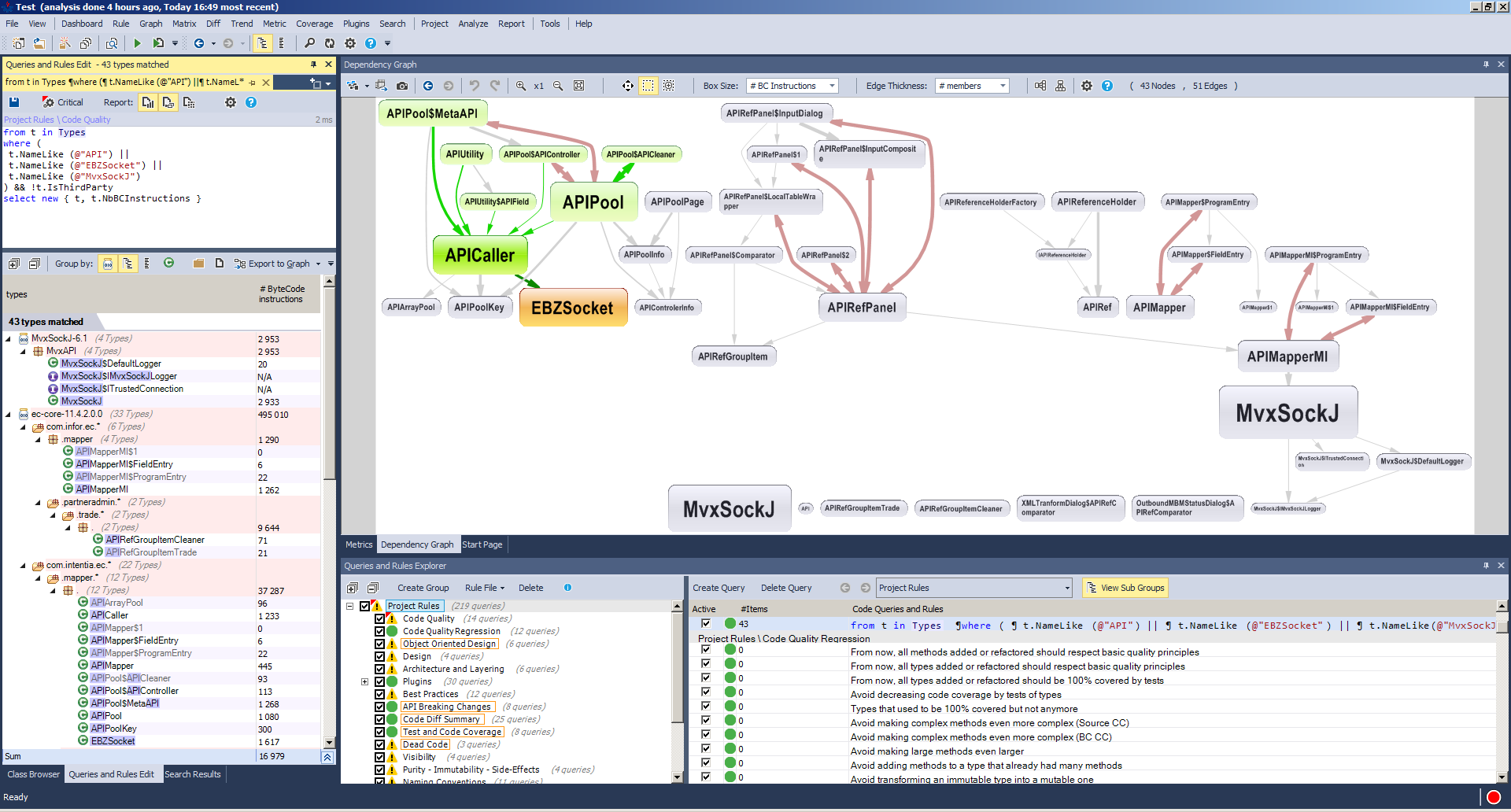
There are plenty of other Java classes in MEC that are related to M3 API, they lead to EBZSocket, but they seem to be used mostly by the mapper, and they require knowledge of the M3 API metadata. I have not looked more into it. Here is a screenshot of the dependency graph from JArchitect:
JArchitect__

Here is some code I found, to be tested:

import com.intentia.ec.mapper.APICaller;

//APICaller ac = new APICaller(poolKey, strUUID, apiEncoding);
APICaller ac = new APICaller(pgm, host, port, user, password, strUUID, apiEncoding, forcedProxy, company, division);
int connectionTimeout = 10000;
int readTimeout = 10000;
ac.initMISock(connectionTimeout, readTimeout);
int startPos = 0;
int maxLength = 28;
String data = "GetBasicData 106AAACRBE01";
ac.setRecord(startPos, maxLength, data);
ac.callMI();

Or:

import com.intentia.ec.mapper.EBZSocket;

EBZSocket sock = new EBZSocket(strUUID, host, Integer.parseInt(port), "EBZSocket", apiEncoding);
String logonStr = "";
sock.mvxLogOn(logonStr, user, password, library, pgm, connectionTimeout, readTimeout, forceProxy);
sock.mvxSend(char[] apiData, int dataLength)
sock.mvxClose();

For future work too.

Conclusion

There does not seem to be a built-in solution to call any M3 API in a process in MEC. However, we can get the existing server properties – either from the API reference holders, either from the property group APIMapper – and use the good old MvxAPI.MvxSockJ to call the M3 API. Now you can add that to your custom process. With some more work, we could perhaps also use the connection pool, and explore more of the remaining Java classes.

I highlighted my favorite with an asterisk.

That’s it!

Thanks for reading. If you liked this, please consider subscribing, give a like, leave a comment, share around you, and help us write the next post.